If you’re running Google Ads for your business, you’ve probably asked yourself this at least once. Should I hire someone to handle this, or can I keep doing it myself?
That’s the Google Ads agency vs DIY debate, and it comes up with almost every small business owner we talk to. Budget is part of it, but your available time and PPC experience will influence that decision just as much.
Our team at Wowelle has managed ad campaigns for Brisbane businesses across dozens of industries, so we’ve watched both paths play out firsthand. This guide covers what each option looks like day to day, where DIY ads hit a wall, and how to tell which path fits your business goals.
Google Ads Agency vs DIY: What Are You Really Choosing Between?
The choice between hiring a Google Ads agency and doing it yourself comes down to two things: how much time you have and how fast you need results. And honestly, the answer looks different for every business.
Both options can work, but they ask for very separate commitments from you. Here’s what each side looks like up close.
What a Google Ads Expert Brings to the Table
When you hire an agency, you get a Google Ads expert who manages your campaigns full time. That means someone is adjusting bids, reviewing your ad spend, and tracking your target audience daily. Their deep expertise with the platform helps them catch wasted spend early, often before you’d even notice it in your account.
Agencies also bring auction insight reports and competitor data that most business owners can’t access solo.
What Managing Campaigns Yourself Looks Like
Running your own PPC campaign means logging into Google regularly to check what’s working and what isn’t. You’ll handle everything from setting your advertising budget to choosing who sees your ads.
It’s time-consuming, and the early learning curve is steep (one wrong match type setting can drain a week’s budget overnight). But if you have the hours to commit, managing campaigns yourself does give you full control over every dollar.
Now, let’s look at where that DIY confidence starts wearing thin.
Where DIY Google Ads Start to Break Down
Most business owners launch their own DIY Google Ads with confidence. The trouble usually hits around month two, when the small tasks start stacking up, and your current campaigns need more attention than you planned for.
These three areas tend to break down first.
Keyword Research Piles Up Weekly: You’ll need to review search term reports, sort through new keywords, add negative keywords, and organize your ad groups on a regular cycle. Miss a week or two, and your ads begin showing for searches that have nothing to do with your business.
Bid Management Requires Daily Attention: Your bidding models need adjustments based on competition, time of day, and device performance. This isn’t something you can set and walk away from. Every dollar spent on a poorly timed bid chips away at your quality score with no return.
Budget Allocation Drains Your Google Ads Account: Without clear data, most advertisers spread budget evenly instead of pulling money from underperforming campaigns and feeding their top performers (it’s easy to keep funding what’s familiar instead of what’s working). That’s the real opportunity cost of DIY, because you end up chasing vanity metrics instead of profitable results.
After working with dozens of Brisbane businesses on their ad accounts, we’ve seen these exact breakdowns in nearly every DIY setup we’ve audited.
Once you see those gaps, the next question is what the alternative looks like.
What Effective PPC Management Looks Like With an Agency
The main advantage of working with an agency is that someone else takes the daily workload off your plate while you focus on running your business.
Effective PPC management covers far more than clicking buttons in a dashboard, though. It means having a team that can fine-tune your campaign goals, track conversions, and continuously test what’s working to maximize ROI.
Let’s walk through two areas where agency teams tend to pull ahead.
Tracking Campaign Performance and Testing New Channels
Agencies review campaign performance weekly using dashboards that connect ad data to lead generation and revenue. They track key metrics like cost per conversion, audience behaviors, and click-through rate instead of vanity numbers that look good but mean nothing.
In our experience, the accounts that get regular check-ins catch budget leaks way before they become expensive. Yet, most business owners never get around to this part on their own.
Google Partners-certified agencies also test new channels like YouTube, Display, and different ad formats to find new audiences. That commitment to expanding reach and audience segmentation is how they maximize results across the full customer journey.
From there, the question becomes where those clicks land.
Why Landing Pages Get More Attention From Agency Teams
Believe it or not, the ad is only half the job. Landing page optimization is where agencies push for the highest conversion rates, because a great ad means nothing if your page doesn’t convert.
Area
DIY Approach
Agency Approach
Page Testing
Occasional tweaks when something feels off
Ongoing testing of headlines, layouts, and forms
Ad-to-Page Alignment
Often mismatched messaging
Copy mirrors the exact ad promise
Performance Tracking
Basic analytics review
Actionable insights tied to geographic targets and campaign goals
Agency teams align page messaging with ad copy so visitors see exactly what they expected after clicking.
Small adjustments to headlines, forms, and page speed often improve performance without increasing ad spend (even something as small as a headline tweak). That combination of ongoing testing and data-backed changes is how agencies deliver profitable results consistently.
Making the Right Google Ads Decision
PPC is an evolving art, and there’s no such thing as perfect optimization. Your ppc needs will shift as your business grows. Maybe you’re a high-end fashion retailer expanding to Bing Ads, or a local Brisbane shop tightening your advertising spend on Google alone. Either way, the question is the same: can you keep up on your own?
Our Google AdWords Tips are a good place to start. And when you’re ready for a team to take over, Wowelle is here to help you turn your ad budget into steady returns.
Tight ad groups, clear tracking, and matching landing pages increase your Google Ads ROI fastest. Most accounts struggle because the structure underneath is messy, even when the ads are strong.
That said, a cluttered account spreads your budget across the wrong keywords and the wrong audiences. It means higher costs per click and fewer conversions for the same spend. Good layout fixes this by keeping every campaign focused on one clear goal.
In this article, we’ll walk through how to build a solid Google Ads setup and avoid the most common setup mistakes. We’ll also show you how to get more conversions from your existing budgets. Read on for a clear plan to improve your Google Ads framework.
What Is Google Ads Structure and What Does It Mean?
Google Ads layout is how you organize your account, campaigns, and ad groups. It controls your targeting and spend. If you get your account structure right from the start, you’ll make every other Google Ads decision with far more confidence.
Here’s a closer look at what makes up that configuration and why it outlines your results:
Google Ads Account, Campaigns, and Ad Groups Explained
Your Google Ads account sits at the top and holds your billing information. Within your account, campaigns control your budget, targeting, and campaign goals. Each campaign is then divided into ad groups, which organize closely related keywords and ads.
Think of it as three layers: account, campaign, and ad group. Each one is nested inside the last. This setup keeps your keywords organized and your ads relevant to what people search for.
Get these three layers right from the start, and you’ll save hours of cleanup later. It also makes future changes far easier to manage.
How Campaign Configuration Affects Performance
Loose setup spreads your spend across keywords and ads that don’t relate to each other. That drags down your quality score and pushes up your cost per click. We’ve seen accounts cut their cost per click in half just by tightening up ad groups.
On the flip side, a well-defined framework does the opposite. It groups similar keywords together, so your ads and landing pages match what people typed into Google. That relevance is exactly what improves your campaign performance over time.
Once your layout is solid, every other part of the account works stronger too. Bidding, targeting, and budget all fall into place faster.
Building Your Campaign Structure Step by Step
Most accounts fail on organization long before the ads or keywords become the problem. A solid setup comes from a few deliberate steps rather than guesswork. Instead of overhauling your entire account, begin with one campaign and refine it first.
With that in mind, let’s break down each step so you know where to focus first:
Setting Up Ad Groups the Right Way
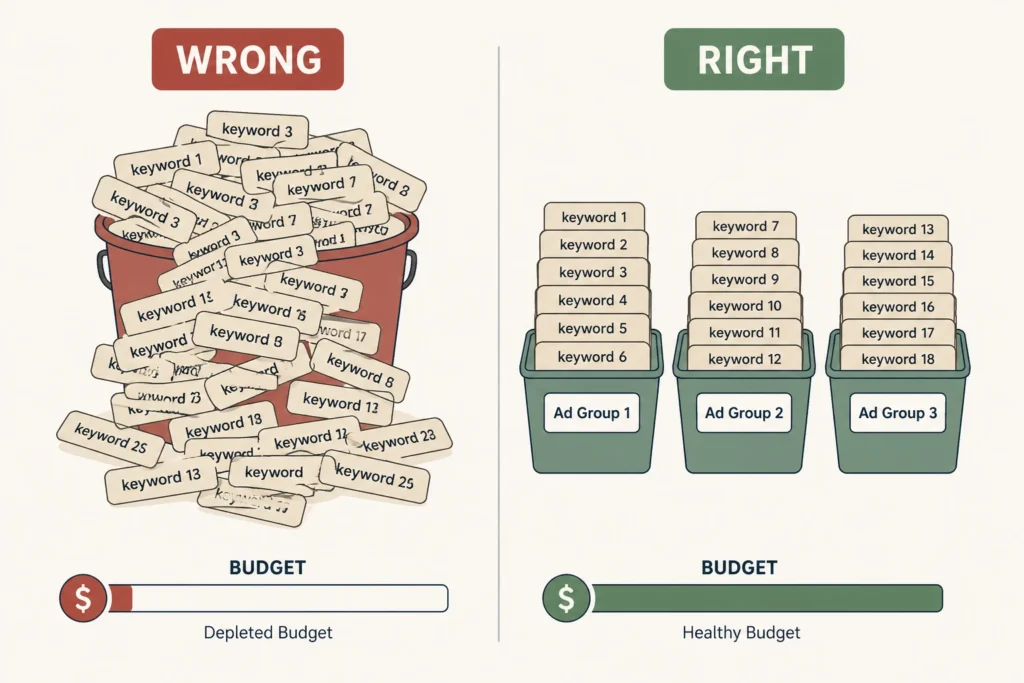
It’s best to group your keywords by refined themes rather than broad categories. Funds disappear in broad groups because Google spreads your spend across searches that don’t convert. Aim for 5 to 20 closely related keywords per ad group.
Next, match each ad group to its own ad copy and landing page. This keeps your message consistent between your ad and landing page. When everything lines up, potential customers know they’ve landed in the right place.
Focused ad groups make it easier to track which keywords bring in the most conversions. That clarity helps you shift more of your budget toward the ads and keywords that perform best.
Match Types: The Setting Most People Get Wrong
Broad match reaches the widest audience, but it wastes the most budget. Phrase and exact match narrow your targeting to searches with clearer intent. In our own campaigns, tightening match types cut wasted spend within the first month.
That said, most accounts do best with a mix of match types. Broad match can help you discover new audiences, while exact match protects your ad dollars on proven keywords. Negative keywords also help filter out searches that waste your spend.
Either way, getting match types right takes some testing, but the payoff shows up quickly in new audiences reached and conversions.
Does Your Ad Copy Match the Layout?
Your ad copy should mirror the keywords inside that specific ad group. If someone searches for “running shoes for flat feet,” your ad should say exactly that. That’s because generic copy loses the relevance your precise setup just built.
In fact, relevant copy raises your click-through rate and quality score together. Google rewards ads that match search intent with lower costs per click. It’s a direct win for your overall ad spend.
With that in mind, test two or three ad variations per group to see which performs best. Small wording changes can shift your click-through rate noticeably.
Can the Right Structure Improve Your Google Ads ROI?
Yes, focusing your campaign framework directly improves ROI. It makes your tracking, targeting, and spend far more accurate. Once tracking is precise, every other decision in your account becomes more data-driven.
For that, have a quick look at the configuration elements that influence ROI the most.
Conversion Tracking and Campaign Performance
Conversion tracking shows you which ad groups bring in leads or sales. Otherwise, you’re making account spend calls based on guesswork instead of real data.
The following elements have a significant impact:
Structure Element
ROI Impact
Conversion tracking accuracy
Reliable data for budget decisions
Ad group segmentation
Easier to spot which groups drive sales
Negative keyword lists
Less wasted spend on irrelevant clicks
Before making any major changes, set up tracking first. If you use target CPA (Cost Per Action) or ROAS (Return on Ad Spend), accurate conversion value data keeps your bidding strategy on point.
Landing Pages: The Overlooked Piece of the Puzzle
Your landing page needs to match the intent behind the ad group’s keywords. A mismatched page increases bounce rate and hurts your quality score. Google notices when your ad promises one thing, and the page delivers another.
E-commerce businesses especially feel this gap. One irrelevant page can sink an entire campaign’s conversion rate, even when the ad itself performs well.
Even well-funded accounts fail due to structural mistakes instead of weak ads. The best part about knowing these mistakes upfront is you can fix them before they drain your budget. Chances are, at least one of these is sitting in your account right now.
To reduce wasted spend, here are the mistakes that show up most often.
Structural Mistakes That Cost You Budget
Mixing unrelated keywords into one ad group confuses both Google and your customers. That mismatch drags down your quality score across the board.
On top of that, running too many overlapping campaigns splits your own ad dollars against itself. This often happens at the campaign or account level, where teams launch new campaigns without checking for overlap.
Both issues are fixable. Cleaning up overlapping campaigns and reorganising unrelated keyword groups can free up wasted spend. Most accounts notice the difference within their first billing cycle.
Fixing an Underperforming Google Ads Account
Start by auditing your ad groups and splitting broad themes into streamlined, specific groups. This alone often improves performance within a few weeks.
After that, pause keywords that aren’t converting and shift that budget toward your best performers. Rebuild landing pages so they match your strongest ad groups first.
Advertisers who focus their strategy here tend to see the fastest gains. Small, consistent fixes like this beat a full account overhaul every time.
Ready to Rebuild Your Google Ads Structure?
A tighter Google Ads structure means better tracking and stronger returns on every dollar you spend. We’ve seen clean ad groups and well-matched landing pages reduce wasted spend and improve campaign performance. So, build a solid layout first, and the rest becomes much easier to manage.
To get started, audit your ad groups and match types this week. That single change often uncovers the quickest opportunities for improvement. Set up your conversion tracking next so that future decisions rely on real data rather than guesswork.
Finally, pick one campaign today and put these changes into practice, or let the Wowelle team handle the audit for you. Either way, you’ll have a clearer view of what’s working and where to improve next.
Most marketing channels slow down at some point. Social reach dips, organic rankings shift, and referral traffic dries up without warning. Google Ads tends to hold steady through all of it, since it runs on intent rather than algorithms or luck.
Stable performance becomes even more valuable during slow seasons, when businesses can’t afford to wait around for traffic to pick back up. That’s also why relying only on organic growth leaves you exposed the moment a platform changes its rules.
In this article, we’ll explain what sets Google Ads apart from other marketing channels and how it performs when budgets are tight. We’ll also cover AI-powered campaigns and where Google Ads fits into a broader marketing strategy. Let’s get into it.
What Makes Google Ads Different From Other Marketing Channels?
Google Ads puts your business in front of people who are already searching for what you sell. That’s the core difference between paid search and almost every other digital channel out there.
The first thing to understand is why Google Ads works differently from most forms of digital marketing.
Paid Search Puts You in Front of Potential Customers Instantly
Google Ads shows up the moment someone types in a relevant search term. There’s no waiting period or algorithm deciding whether your business deserves visibility that day.
Compare that to SEO, which can take months of content creation and backlink building before you see any movement in search engines (and most Brisbane business owners don’t have that much time to spare). The ranking process is slow by design, since Google needs time to trust a new page.
This speed helps most when a business needs leads quickly. So naturally, if business turns sluggish and you need traffic now, organic search just can’t keep pace.
Other Channels Depend on Timing, Algorithms, and Luck
Social media ads work differently from paid search, since your reach depends entirely on a platform’s algorithm that day. One week, thousands of people see your posts, and the next week, barely anyone notices.
Referral and organic traffic follow a similar pattern, dropping the moment seasonal interest fades or your rankings shift. In fact, based on our observations, campaigns lose half their traffic overnight from a single Google update.
Google Ads stays consistent through all of this because you control your ad spend, audience targeting, and timing directly. No algorithm change can take that control away from you.
How Campaign Performance Holds Up When Budgets Get Tight
Campaign performance holds steady when targeting and bidding stay focused, even during tight budgets. That consistency is what keeps Google Ads reliable, even when businesses cut other marketing activities first. A smaller budget doesn’t have to mean fewer leads.
Cost Per Lead Stays Steady With the Right Setup
Proper keyword targeting and wise bidding keep your cost per lead (CPL) from swinging wildly month to month. One important point that often gets overlooked is testing your bid strategy before scaling spend further.
A few factors drive that cost more than anything else:
Bid Strategy: Manual or automated bidding determines how much you pay for each click. The suitable approach helps control costs while keeping your ads competitive in the auction.
Quality Score: A stronger match between your keywords, ad copy, and landing page can improve your Quality Score. Higher scores often reduce your cost per click, which allows your budget to generate more qualified leads.
Competition Level: More businesses competing for the same keywords usually increase the cost per click (CPC). In many cases, niche or long-tail keywords provide stronger value, especially in highly competitive industries.
If you get these three factors right, your cost per lead stays predictable enough to plan a real budget around.
What a Solid Google Ads Setup Looks Like
Strong keyword targeting and clear ad copy form the foundation of any campaign that performs well. Skip that groundwork, and even a generous advertising budget won’t generate qualified leads consistently.
Your bid strategy also affects how often and where your ads appear on the search results page (small tweaks basically move the needle here). A slightly higher bid on your top keywords can mean the difference between page one and page two.
That said, a well-structured setup naturally keeps cost per lead in check. Once that foundation is solid, the next question becomes how fast AI-generated campaigns can build on it.
Can AI-Powered Campaigns Help You Generate Leads Faster?
AI-powered campaigns speed up lead generation by adjusting bids and targeting automatically, without you having to step in constantly. That speed shift is changing how fast businesses see results from paid search.
Let’s look at how AI speeds up campaign management and why your landing page still determines the final outcome.
AI-Powered Campaigns Adjust Bids and Targeting in Real Time
These campaigns analyse performance data and adjust bids automatically as new signals come in. In our experience, they respond much faster than manual bidding, adapting to customer behaviour in real time.
Google’s machine learning also identifies patterns human managers might miss entirely (like which time of day brings in the most qualified leads). It catches small shifts in click-through rate that a human manager would likely miss.
That said, a well-planned strategy remains essential. This technology still needs clear campaign goals and the right negative keywords to avoid wasting ad spend on the wrong searches. In case you’re confused, you can learn more about common Google Ads mistakes to avoid.
Your Landing Page Still Decides Whether Leads Convert
Even the slickest campaign fails if the landing page disappoints visitors once they arrive (great ads send traffic to painfully slow pages more than once). Speed and clarity are important just as much on your side as they are on Google’s.
Several key factors have the greatest impact:
Load Speed: Pages that take more than a few seconds to load lose interested prospects fast. Even a slight delay can increase bounce rates before visitors have a chance to see your offer.
Clear Offer: Visitors should understand what you’re offering within the first few seconds on the page. If the value isn’t immediately obvious, many will leave instead of exploring further.
Simple Form: A short lead form submission process converts more effectively than one with too many fields. Remember to ask only for the information you need, as every extra field creates another reason to abandon the form.
Pair your campaign with the landing page, and the leads your campaign generates have a chance to convert. This leads to a broader question: how does this all fit into your overall marketing strategy?
Building a Marketing Strategy That Supports Your Business Goals
The best part about a solid marketing strategy is how it ties every channel back to your business goals instead of treating each one separately. In fact, Google Ads works best when it supports the larger picture rather than running on its own.
Here’s how to tell what’s working and when your Google Ads strategy needs attention:
Using Analytics Tools to Track What Is Working
Analytics tools show you exactly which keywords and ads generate leads, instead of leaving you to guess based on gut feeling. That kind of visibility changes how you spend your advertising budget going forward.
Tracking conversions helps businesses adjust strategy instead of guessing blindly, and Google Ads integrates directly with platforms like Google Analytics to make that tracking simple. Honestly, guessing is the fastest way to burn through a budget with nothing to show for it.
Comparing performance against industry averages also tells you whether your numbers are genuinely solid. For example, a 3% conversion rate might sound low until you learn the industry average sits at 2%.
Signs It’s Time to Adjust Your Google Ads Strategy
Not every dip in results means your campaign has failed, but a few warning signs are worth watching closely.
Warning Sign
What It Looks Like
Rising Cost Per Lead
Your cost per lead climbs without bringing in more leads to show for it.
Dropping Conversion Rates
Traffic stays steady, yet fewer visitors turn into paying customers than before.
Stale Ad Content
Your ad copy or keywords haven’t changed in months, even as customer behavior shifts.
Catching these signs early gives you time to adjust before a small dip becomes a problem. A quick review of your campaign every few weeks usually catches most of this before it gets serious.
Ready to Turn Slow Months Into Lead-Generating Months?
Google Ads often remains effective even when other marketing channels become less predictable. Cost per lead, AI-powered campaigns, and landing page fundamentals all work together to keep your leads flowing.
These basics create a solid benchmark for future decisions. Instead of making changes based on guesswork, you’ll know where your campaign stands and what deserves attention first.
Wow Elle has helped plenty of businesses overcome slow months and generate their best results yet. If you’re ready to see what your Google Ads campaigns could be doing for your business goals, let’s talk through your next move.
Every Brisbane business owner hits this question at some point. You’ve got a set budget, you want to bring in more customers, and the advice starts coming from all directions. Someone tells you to run Google Ads, and others tell you to invest in digital marketing through SEO. So which one do you pick?
Well, it depends on what you need and when you need it. Paid traffic gets you in front of people fast, but organic traffic builds something that keeps working without a cost on every click.
This guide breaks down both channels so you can figure out where your money works hardest for your goals right now.
Google Ads vs SEO: What Is the Difference?
Google Ads puts your business at the top of search results instantly by paying per click, while search engine optimisation builds organic rankings over time through content and keywords.
With paid ads, you pay Google every time someone clicks your link. Your ad shows up on the search engine results page above the free listings. However, the moment you stop paying, your spot disappears.
SEO works in a completely different way. Instead of paying for visibility, you build it over time through quality content, a well-structured site, and strong backlinks. It usually takes longer to see results, but once it starts working, you won’t have to pay for every click that comes in.
How Google Ads Work
The best part about Google Ads is that you can start driving traffic on the same day you launch. That kind of speed makes it a strong option for businesses that need quick wins, especially when paired with a well-optimised Google Business Profile. Let’s break down how it all works.
Your Budget, Your Visibility: How Bidding Works
Google Ads runs on a pay-per-click model. You bid on search terms your target audience is already using, and Google runs an auction every time someone searches.
The winner is decided by two things: your bid amount and quality score. Ad relevance and landing page quality also affect where your ad appears in search results.
These factors often separate a well-managed PPC campaign from one that wastes budget without results. You can learn more about common Google Ads mistakes to avoid.
What Happens When You Stop Spending?
Honestly, paid advertising follows a different approach compared to SEO. The moment you pause your paid campaigns, ads vanish, and traffic drops with them. As a result, every visitor you gain through paid traffic comes at a direct cost to your ad spend.
For short-term goals or product launches, that trade-off is totally fine. As a standalone long-term plan, though, it gets expensive very quickly.
Ultimately, Google Ads gives you control and speed, but it works best when you have a clear goal and a budget you can sustain.
Organic Search and SEO: The Digital Strategy of Keyword Data
What if your website kept bringing in traffic every single day without you spending a cent on ads? That’s what a good SEO strategy can do for your business over time.
Here’s how it all comes together.
Keyword Research and Content Marketing: Where SEO Begins
SEO starts with keyword research, which means figuring out exactly what your audience types into Google. From there, you create keyword-relevant content, and that user-generated content feeds your overall content marketing plan to pull in organic traffic.
The payoff is worth the effort. When you create content that answers real questions, Google rewards you with stronger visibility and steady traffic over time.
Can You Combine SEO and Paid Search?
Absolutely, and many businesses do. Run organic and paid channels side by side to gain immediate visibility through ads while your organic SEO rankings build over time. Paid campaign data also shows which keywords convert best.
Feed those findings into your SEO efforts, and your whole strategy gets sharper. Many QLD small businesses start this way, and it likely works well.
By contrast, organic search optimisation takes patience, but the traffic it brings in doesn’t come with a cost for every click.
Speed vs Staying Power: Which Channel Wins?
The answer depends on what your business needs most, either quick visibility or long-term growth. Google Ads delivers quick results, while SEO builds momentum that lasts well beyond the initial effort.
To understand how each channel supports your growth, take a closer look at how they move your business forward:
Google Ads
SEO
Speed
Results within hours
Takes 3-6 months
Cost
Pay per click, ongoing
Time investment upfront
Longevity
Stops when budget runs out
Builds over time
Generate Leads
Immediate
Gradual
Keyword Data
Available instantly
Builds over time
Website Visitors
Paid, consistent
Free, compounding
Marketing Efforts
Ongoing spend required
Compounds with time
The table makes one contrast pretty clear. Google Ads wins on speed, and SEO wins on longevity. Your paid traffic gets you in front of website visitors quickly, but organic and paid together give you the most balanced marketing effort over time.
So the final decision depends on where your business is right now and what you need most.
Matching the Channel to an Effective Digital Marketing Strategy
The right channel choice saves you money, time, and a lot of frustration down the road. The best option depends on your goals, budget, and timeline. Most businesses land in one of these situations:
New Business, Fast Results: Google Ads suits you best when you need to generate leads quickly. A focused paid campaign puts your business in front of potential customers within hours of launching, which is hard to beat when you’re just starting out.
Long-Term Growth, Lower Costs: SEO works best when you can play the long game. Over time, a strong organic strategy builds slowly, and your cost per lead gradually decreases as rankings improve.
Tight Budget, Big Goals: Organic SEO is worth prioritising when ad spend is limited. Although it takes time to build, each ranking page can continue driving traffic without ongoing cost per click.
Established Brand, Full Funnel: Once you have some traction, combining SEO and paid ads creates a complete strategy. It helps you capture attention early and stay visible through every stage of the customer journey.
The channel you pick should match where your business is today. Start there, and adjust as you grow.
The Most Effective Move: How to Combine SEO and Google Ads
Most businesses treat these two channels as an either/or decision, but a cohesive strategy uses both. Your paid campaigns generate instant traffic while your organic rankings grow in the background. That balance covers your short-term results without ignoring long-term visibility.
The main advantage comes from your keyword data. Ad performance tells you which search terms convert, and that feeds directly into your SEO strategy. You can then start building content around what will work.
On top of that, email marketing fits naturally into the mix. Once both channels bring visitors to your site, personalised communication helps you nurture leads and keep those people coming back.
And Google Analytics ties it all together. It shows where your traffic comes from and which digital channels pull their weight.
New businesses with a tight budget do well starting with paid campaigns. You get quick data, swift traffic, and clear feedback on what works. Gradually, you can build your customer engagement alongside it and reduce your reliance on ad spend.
On the other hand, businesses with more time and budget flexibility are better suited to starting with SEO. While results take longer to build (usually 3 to 6 months), website traffic grows over time and helps reduce your cost per lead as organic rankings improve. In the meantime, targeted paid advertising can help fill the gap and drive steady traffic.
Either way, the goal is a digital marketing setup that doesn’t depend entirely on one channel. So start where your budget and timeline allow, and grow from there.
Your Next Step Starts Here
Both Google Ads and organic search play an important role in a strong marketing strategy. Businesses that achieve consistent online success don’t treat them as separate or competing channels. Instead, they combine both into one cohesive digital strategy.
Your budget, timeline, and goals all point toward the right answer. It just takes someone who knows your business well enough to help you find it. That’s what Wowelle does.
Our team helps Brisbane businesses build digital marketing plans that get results using paid ads, organic search, or a mix of both. If you’re ready to stop guessing and start growing, reach out to the Wowelle team today for a free strategy chat.
Beginners waste money on Google Ads by ignoring search intent, creating messy campaign structures, and using broad match types without proper control. In fact, most people don’t notice these mistakes until they have already spent hundreds or thousands of dollars.
And worst of all, Google Adwords won’t tell you what went wrong here. Your ads keep running, clicks keep coming in, but conversions do not follow. As a result, you end up questioning your PPC campaign while Brisbane businesses down the street continue generating results.
We’re breaking down the most common Google Ads mistakes beginners make, so you can fix them early. Plus, you’ll learn how to fix your ad campaigns, save money on wasted spend, and actually get new customers from your ads.
Google Ads Mistakes That Kill Your Budget Fast
Your ad budget disappears in days, and you have no idea where the money went. This doesn’t happen randomly.
In most cases, a few common mistakes are behind it. Let’s break down each one so you know exactly what’s draining your budget.
Why Search Intent Ruins Your Ad Performance
It often starts with a mismatch between what your ads promise and what people are actually searching for. For example, your ad copy might say “cheap plumbing repairs,” but search intent shows people need emergency services right now. So when the message does not match what users expect, they click and leave immediately.
As a result, mismatched keywords send the wrong traffic to your landing pages, which leads to wasted ad spend on clicks that never convert (and trust us, we’ve watched clients burn $5,000 learning this the hard way). You’ll also end up paying Google for visitors who leave within seconds because your ad relevance is off.
Over time, this shows up clearly in your data. When you check your Google Analytics search results, the pattern becomes obvious: high clicks, poor conversions, and a drained budget.
Too Many Ad Groups Equals Wasted Budget
Another issue comes from how campaigns are structured. If you stuff 20 keywords into one ad group, it quickly destroys your quality score and ad relevance. Because Google AdWords rewards tight, focused ad groups where every keyword aligns with the same search intent.
To support this, each ad group needs tight keyword research with 5–10 closely related search terms. This keeps your ads sharp and your landing pages relevant to keep your PPC on track.
Spreading your monthly budget too thin across multiple ad groups creates another problem. With a limited budget per campaign, Google cannot gather enough data to learn what works. So, you end up with 15 campaigns getting $3 per day instead of 3 campaigns getting $15.
Your Search Terms Report Shows the Real Story
Even with the right structure, performance can still drop if you ignore your data. Most beginners never check which exact search terms brought up their ads, so they keep paying for irrelevant traffic.
You can solve this issue by checking the search terms report in your Google Ads account. This report will show you what people actually typed before clicking your ad. This will help you narrow your keyword focus.
From there, adding negative keywords helps to stop irrelevant clicks and can save a large amount of ad spend immediately. For example, your “Brisbane plumber” ad might show up for “Brisbane plumber salary” or “Brisbane plumber jobs.” Those clicks cost money but bring zero customers.
In addition, search partners often bring in low-quality traffic that your search terms report will highlight quickly. If the data shows poor performance, turning off search partners can project your budget.
At the end of the day, your job is to make sure every dollar in that ad spend works for you.
Campaign Structure Problems Nobody Talks About
A well-structured campaign reduces wasted budget from the start. And once the major issues are addressed, the underlying problems become even more visible.
Here are the structural problems killing your Google Ads campaigns right now.
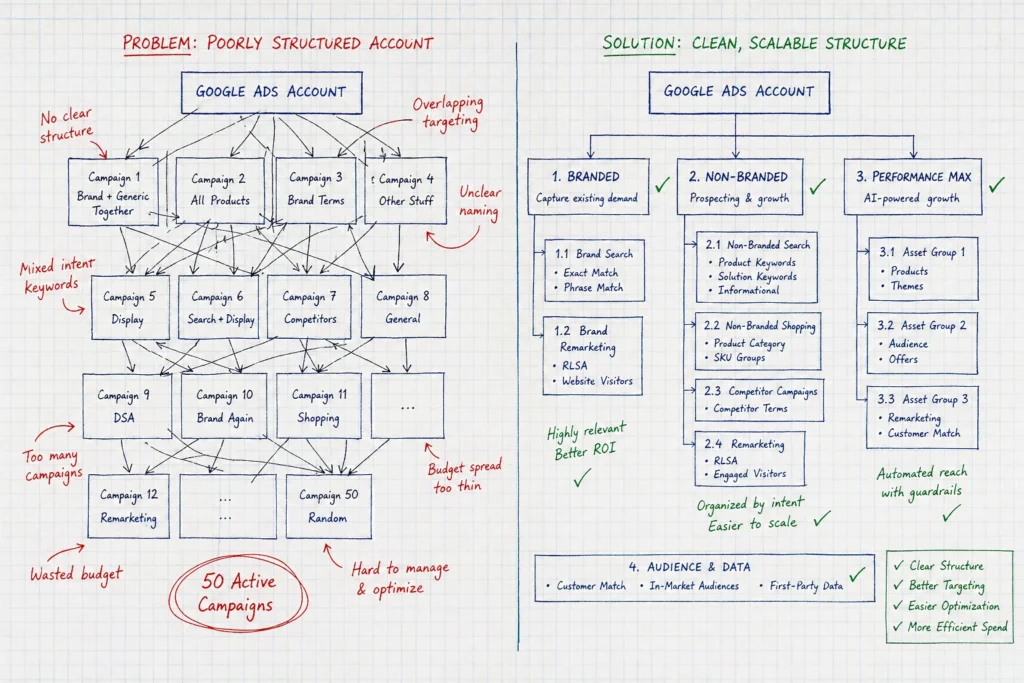
Mixed Intent Campaigns: One of the most common issues appears when campaigns mix different types of search intent. Many beginners place “buy running shoes” and “running shoe reviews” in the same Google Ads campaigns. However, these searches reflect completely different goals, so your ads struggle to perform effectively.
Performance Max Without Tracking: Without conversion tracking, Google has no direction and ends up draining your budget (unless you enjoy gambling with your marketing budget). Based on audits of over 200 Google Ads accounts in Brisbane, we’ve seen this issue appear in nearly 60% of them.
Branded vs Non-Branded Together: Your Google Ads account needs separate search campaigns for each type. Because someone searching your brand name is ready to buy, while generic searchers require different automated bidding strategies and target CPA settings.
Too Many Active Campaigns: As accounts grow, another issue begins to surface. Some account managers tend to run 50 campaigns in parallel. At that scale, it becomes difficult to monitor PPC performance or manage bids effectively, which leads to missed issues.
Bidding Without Conversion Data: Even with the right structure, bidding can fail without enough data. In practice, target CPA strategies need at least 30 conversions per month. Without that volume, Google AdWords cannot learn what works and ends up spending inefficiently.
Pro Tip: To bring everything back under control, focus on 3–5 high-performing campaigns, and fund them properly with your monthly budget. Gradually, you’ll start to see your PPC campaign numbers improve.
Landing Pages vs. Ad Copy: The Disconnect
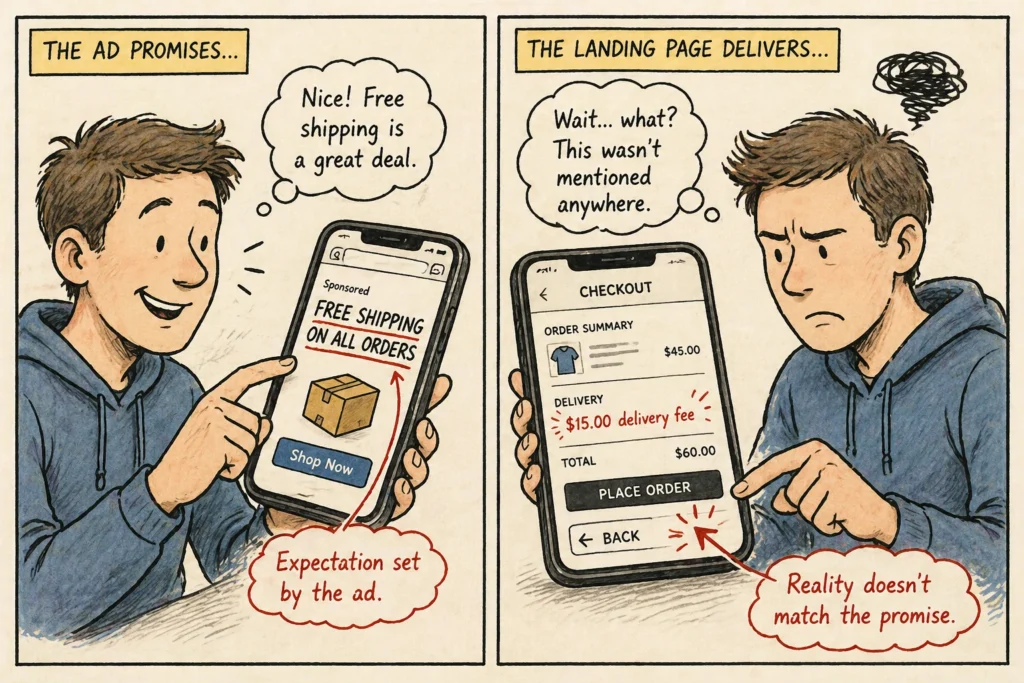
People click your ad, land on your page, and leave in 3 seconds flat. This happens when your ad copy and landing page do not match, even if each one performs well on its own.
This disconnect shows up in real campaigns like this:
What Your Ad Says
What Your Landing Page Shows
Free shipping on all orders
$15 delivery fee at checkout
Blue running shoes on sale
Generic homepage with no shoes visible
Mobile-friendly shopping experience
Desktop layout broken on mobile devices
“Click here to get started.”
Confusing navigation with no clear CTA
We see this intent mismatch almost daily, where someone clicks “blue running shoes” and lands on a page showing everything except blue running shoes.
When that happens, Google responds quickly by dropping your quality score. And your Cost Per Click (CPC) increases and your ad position falls on the search results page.
Different Match Types Control Your Spending
Now that you know the structural mistakes, let’s talk about various match types and how to control your spending in real campaigns.
When Broad Match Becomes a Money Pit
Broad match keywords with low search volume bring in thousands of irrelevant search results that nobody wants. You bid on “plumber Brisbane,” and your ads show up for “plumber jobs Brisbane” or “plumber salary Brisbane.” Butnone of those searchers need your services.
This happens because Google AdWords interprets broad keywords however it wants, often showing ads for unrelated search engine queries. That’s why this match type needs constant supervision.
Without tight negative keyword lists, the problem gets even worse. It burns through money faster than most other Google Ads mistakes. To stay ahead of this, you should check your search terms report weekly; only then will you catch the worst offenders before they drain your ad budget.
Why Phrase Match Saves You From Irrelevant Clicks
Phrase match gives you better control over search terms while still capturing useful variations that an exact match might miss.
In practice, your ad shows up when someone types your exact phrase along with additional words before or after it. This keeps your reach flexible without opening the door to completely unrelated searches.
That shift also impacts costs. Switching from broad match helps reduce unnecessary spending while keeping lead flow steady. At the same time, your Cost Per Click drops because you are no longer competing for irrelevant searches.
Ad Extensions You’re Probably Not Using
Beyond match types, ad extensions help you get more value from the same spend. Therefore, your campaign performance improves without increasing your budget.
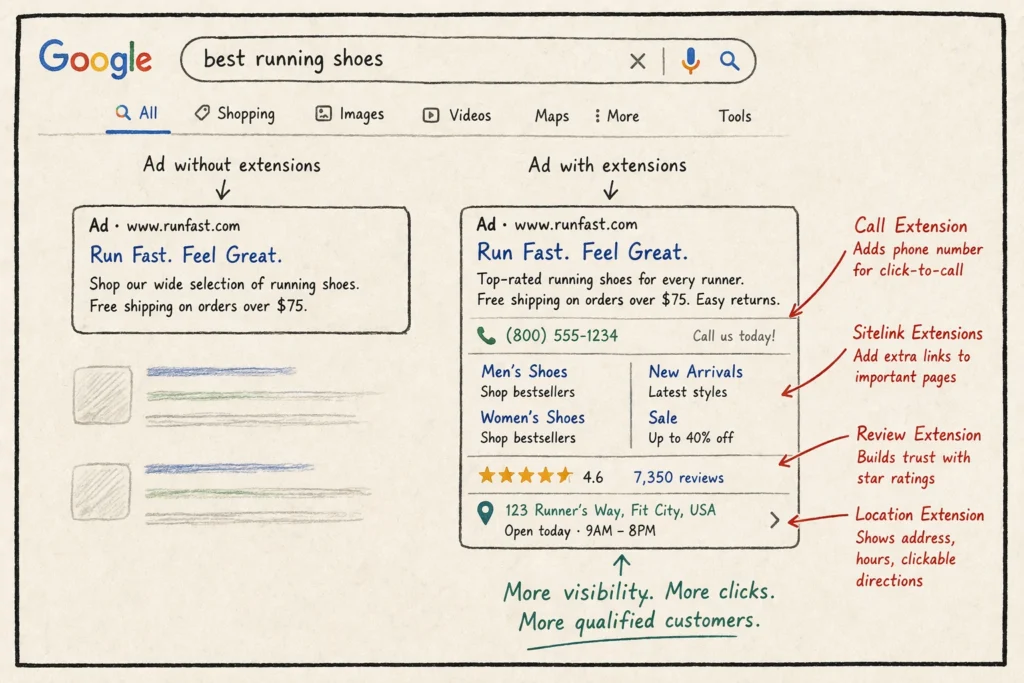
For example, call extensions generate phone calls directly from mobile devices and often convert better than standard clicks. That means users can tap your number instantly instead of navigating through your landing pages.
Despite this advantage, many beginners hit publish (launch campaigns) without adding any extensions. So they miss out on extra visibility and stronger performance that is already available within Google Ads.
Stop Wasting Money and Fix These Issues Now
You can fix these Google Ads mistakes today and see results by tomorrow. Start with your search intent problems, tighten up those ad groups, and check your search terms report. Then, switch from broad match to phrase match and add some ad extensions while you’re at it.
The thing is, most Brisbane businesses waste hundreds on Google AdWords before they figure this stuff out. But you don’t have to be one of them. Run ads the right way from day one, and you’ll save money while getting more traffic and new customers through digital marketing.
Still feeling overwhelmed by all the settings in your Google Ads account? Wow Elle helps Queensland small businesses get their PPC campaigns running without the guesswork. We’ll take a look at what’s draining your ad spend and show you exactly how to turn things around for better lead generation.
If you’re a small business owner trying to figure out where to spend your advertising budget, this challenge affects thousands of businesses.
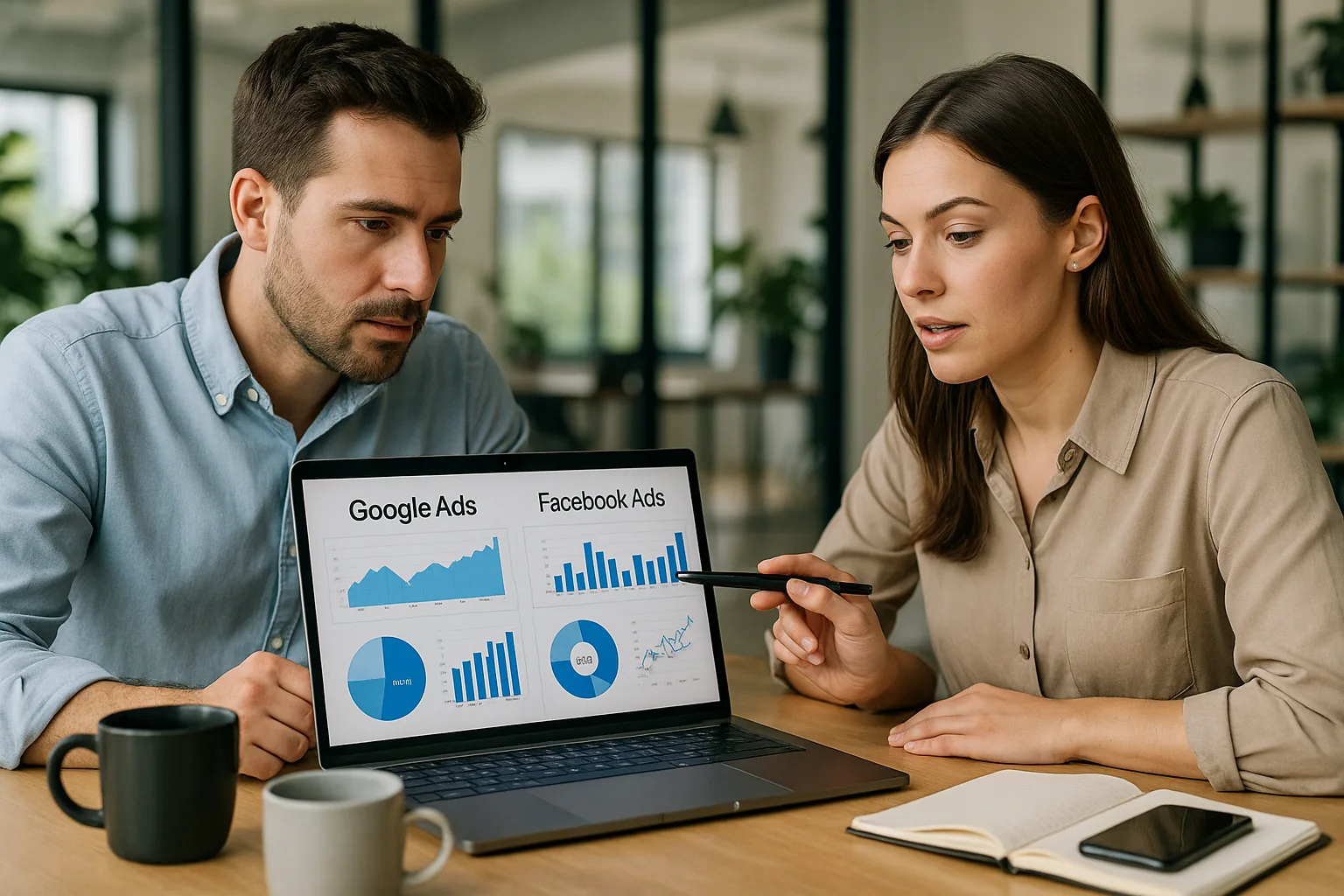
In this guide, we’ll break down Google Ads vs Facebook Ads in simple terms so you’ll know exactly which platform will deliver better results for your business and budget.
We’ll cover:
Why Facebook Ads work better for building brand awareness
Capture high-intent customers through Google’s search platform
Real cost comparisons and ROI expectations
Budget allocation strategies vs guesswork approaches
Better lead quality and conversion rates you can expect
How to get started without wasting money
We’ve helped small businesses across Australia choose the right paid traffic strategy using these same methods.
Read on to learn more about Google Ads vs Facebook Ads the right way.
Google Ads Brings Customers Ready to Buy
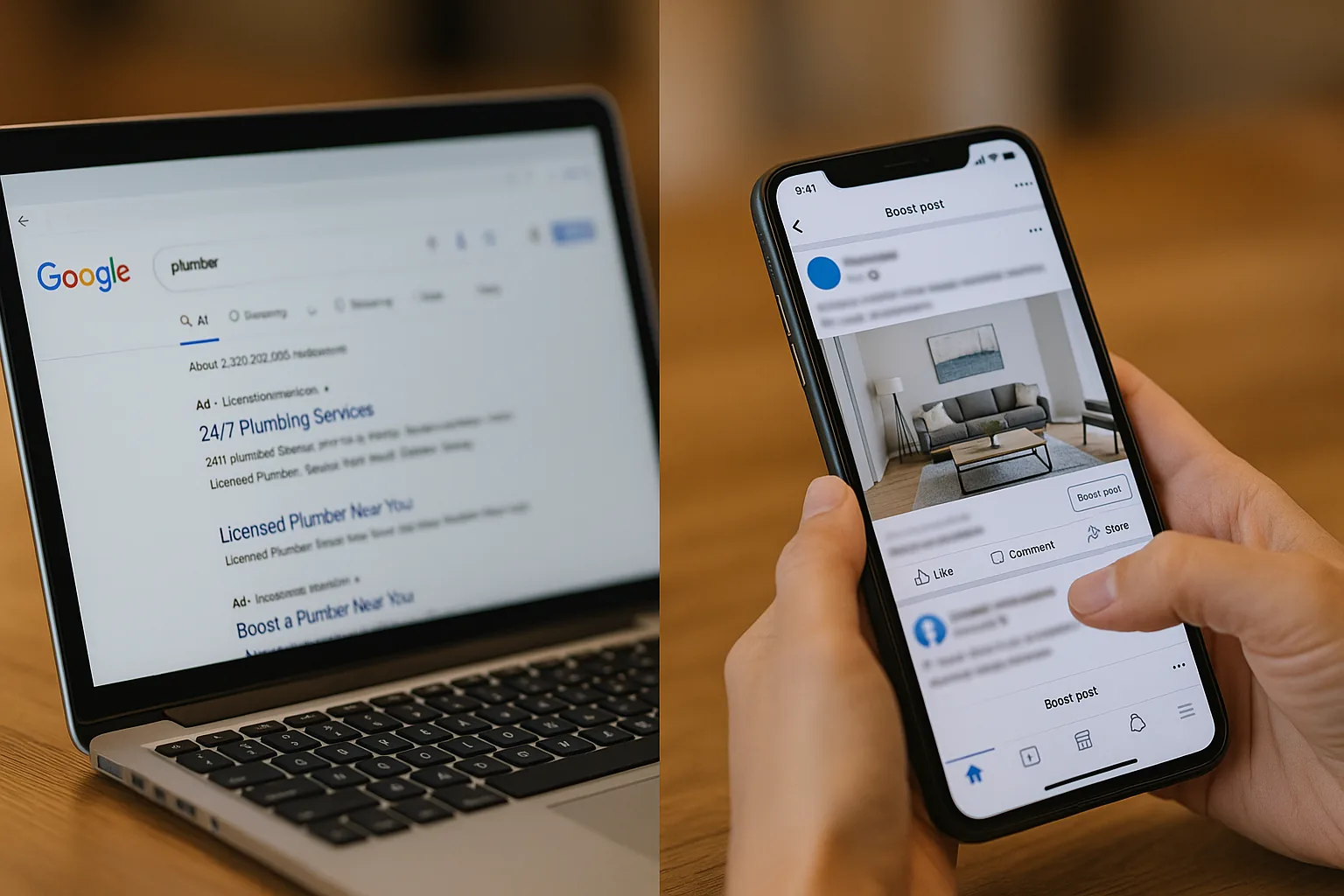
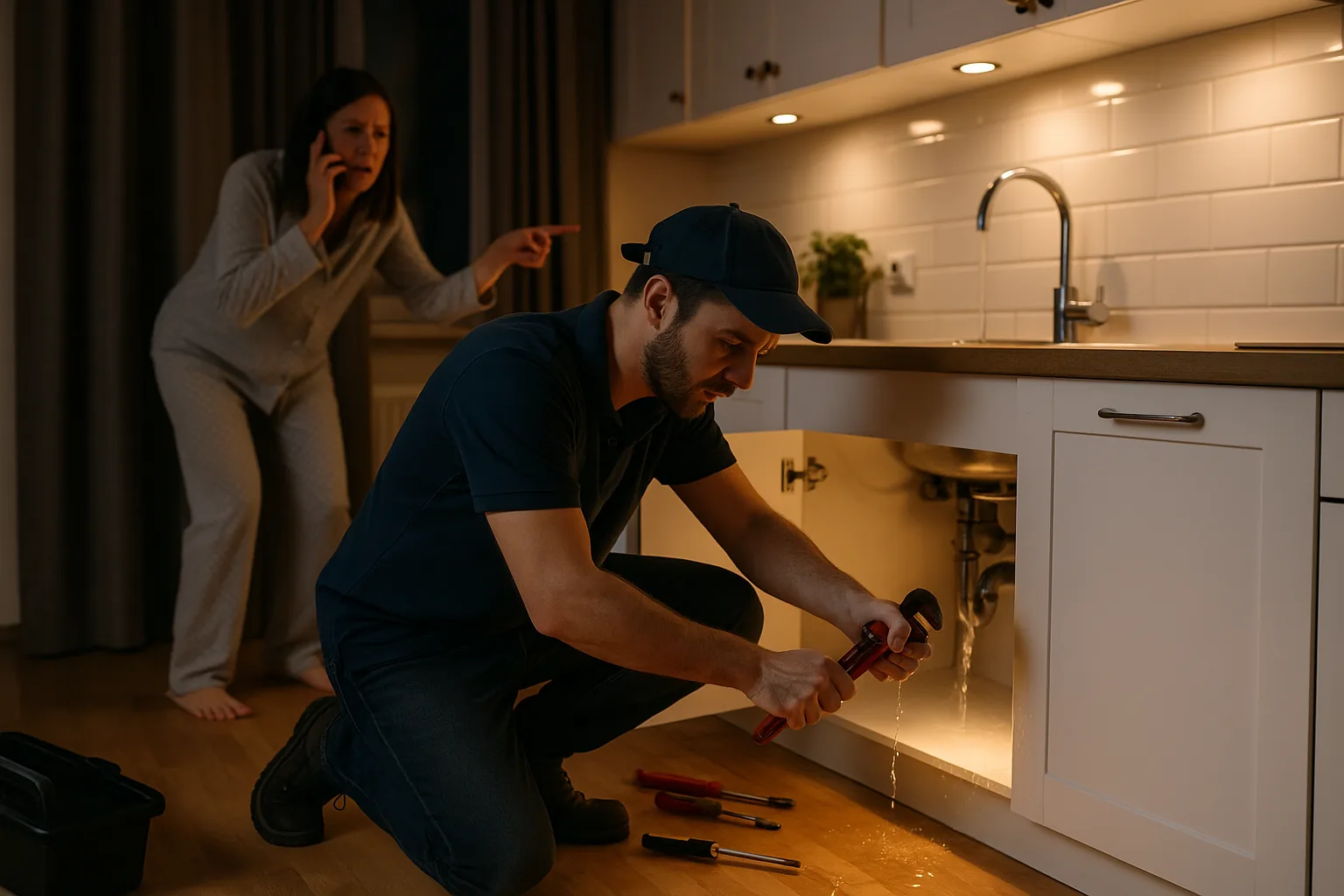
Picture this: someone types “plumber near me” at 2 am with a burst pipe flooding their kitchen. They’re not browsing for fun; they actually need help, and they’re ready to pay for it.
This real-world example demonstrates the core advantage of paid search advertising.
How Paid Search Captures High-Intent Traffic
Google Ads work because of search intent. This means when people actively search for your services, they’re already much further along in their buying journey than someone just scrolling through Facebook. That’s exactly why your keyword research strategy becomes so important.
For example, you want to target phrases that show immediate need. Think words like “emergency,” “now,” “today,” or location-specific terms. These searches signal real urgency.
Our investigation showed that PPC campaigns on Google deliver 3x better conversion rates than social media ads. The reason is straightforward. Paid search reaches customers with genuine buying intent, rather than casual browsers killing time on social media.
Ad Formats That Work for Small Budgets
To get the most out of your limited budget, you don’t need to rely on fancy video ads.
Start with search ads using exact match keywords to control costs. This tactic allows you to target only the most relevant searches, ensuring you’re not wasting money on irrelevant clicks.
Once you identify which ads convert, you can expand your campaigns gradually while still staying within your budget.
Now, let’s look at how Facebook Ads work.
Facebook Ads Build Awareness Among Your Ideal Audience
What if your ideal customers don’t know they need your services yet? That’s where Facebook Ads shine.
While Google Ads catch people actively searching, Facebook Ads introduce your brand to potential customers who haven’t started looking.
Facebook Ads operate on three main principles:
Precision Audience Targeting: Target people based on their interests, not just keywords. Facebook knows if someone recently moved, got married, or started a business. This interest-based targeting helps you reach your ideal audience before they start searching for solutions.
Visual Storytelling That Works: Photos and videos grab attention like text ads never could. For instance, carousel ads, customer testimonials, and behind-the-scenes content showcase your work directly in people’s feeds.
Budget-Friendly Reach: When it comes to cost, Facebook Ads offer a major advantage. You can expect to pay $0.50-2 per click compared to Google’s $5-15 range. Those savings mean your social media marketing budget stretches much further and potentially reaches thousands more prospects.
But here’s the catch: Awareness doesn’t always equal sales, especially compared to organic traffic from search engines.
Which Platform Delivers Better Value for Your Dollar?
Google Ads typically delivers better value for small businesses, despite higher upfront costs. Here’s why the numbers favour search advertising over social media marketing.
Lead Quality Comparison: Why do Google Ads convert better than Facebook Ads? People from Google Ads convert much better than Facebook traffic. The reason is very easy: search intent beats casual browsing every time. Your PPC campaigns should prioritise quality over quantity when comparing these platforms.
True Cost Analysis: Facebook’s lower click costs hide the real story. While Facebook Ads cost less per click, Google’s higher conversion rates often deliver better cost per customer. So track both platforms using Google Analytics and landing page data to see actual acquisition costs for your business.
Customer Lifetime Value: Consider the lifetime value of each customer you acquire. After all, small businesses need repeat customers, not one-time buyers. Our research found that Google ad customers typically spend more over their lifetime compared to social media leads. This makes the higher upfront investment worthwhile.
For small businesses, the priority becomes measuring real results instead of ad spend. Focus on customers gained, rather than clicks purchased.
Practical Budget Allocation Strategies That Work
Most small businesses waste money by putting all their paid traffic budget into one platform. A more strategic method is to use both Google Ads and Facebook Ads.
Follow these practical steps:
Start with a 60/40 split: Allocate 60% to Google Ads and 40% to Facebook Ads. This captures both active searchers and potential customers who haven’t started looking yet.
Avoid large budget launches: Never launch both platforms with big budgets simultaneously. This approach often leads to wasted ad spend and poor initial results.
Test with smaller amounts first: Why risk hundreds of dollars? Modest budgets reveal which PPC ads perform better for your specific business before scaling up.
Scale the winner gradually: The platform delivering better results deserves more of your budget. Increase spending on the winner while maintaining some organic traffic diversity across both channels.
Armed with this budget framework, the final step is determining which platform aligns best with your business needs.
Making the Right Choice for Your Business
Small businesses often struggle with choosing between Google Ads and Facebook Ads for their limited advertising budgets. This decision can determine your marketing success and growth trajectory. Fortunately, proven strategies exist to help you invest wisely and maximise returns.
We’ve covered how Google Ads capture high-intent searchers ready to buy, while Facebook Ads build brand awareness among potential customers. Both platforms serve different purposes in your overall paid advertising strategy.
Ready to boost your leads? Contact us today to create a customised Google Ads strategy that delivers real results for your business.
Have you ever clicked on a Google ad and thought, “That got me”? Well, most people haven’t. The vast majority of ads get scrolled past without a second glance. That’s a lot of wasted money.
I see it all the time. Business owners spend hours setting up perfect campaigns, then write ad copy that sounds like a robot wrote it. And then they wonder why nobody clicks!
Good ad copy changes everything. When you use the right words, your failing campaign can change and become a money-making machine.
Here’s what I’ll show you:
Simple tricks to write headlines people read
The exact words that make people click
Real ads that worked (and why they worked)
Mistakes that cost you money every day
Stick with me, and you’ll learn how to write ads that people can’t ignore. Let’s dive in.
Understanding the Core of Google Ads Messaging
Google ads messaging comes down to one simple idea: talk to people like real humans. You need to speak your customers’ language and solve their problems. When someone searches for what you offer, your ad should feel like the perfect answer they’ve been looking for.
Strong messaging can change your business results completely. Your PPC (pay-per-click) campaigns can drive thousands of people to your website, but weak ad copy sends them straight to your competitors. The right words at the right moment can boost your sales and grow your customer base.
To write ads that work, you need to understand two core principles that separate successful campaigns from failed ones:
Decoding User Intent and Audience Relevance
Your keywords and ad copy need to work together perfectly. When someone searches for “best running shoes for flat feet,” your ad should mention flat feet support, not just generic running shoes. In that way, Google flags your ad as relevant, which improves your rankings and lowers your costs per click.
People search for different reasons, though. Some want to learn something new, and others are ready to buy right now. You need to figure out what your audience wants and give them exactly that. If your keywords suggest someone is comparing options, your ad should show what makes you different. And, if they’re ready to purchase, focus on special offers or fast delivery.
Past the Click: The Purpose of Powerful Ad Messaging
Think about what happens after someone clicks your ad. Will they find what they expected? Does your landing page match your ad’s promise? Great copywriting connects these dots smoothly, and your success depends on getting this entire experience right from search to sale.
Every word should guide users toward taking action, whether that’s making a purchase, signing up for updates, or calling your business. The best ads get clicks from people who are genuinely interested in becoming customers.
If these foundations are in place, then let’s learn some specific elements that make ads impossible to ignore.
Creating High-Impact Ad Elements
High-impact ads have three main parts that work together like a well-oiled machine. You’ve got compelling headlines, persuasive descriptions, and smart keyword placement. Each element plays a specific role in grabbing attention and driving clicks.
When you use eye-catching headlines, they grab attention and stop people from scrolling past your ad. Once you’ve caught their eye, well-written descriptions step in to convince them to take action. Meanwhile, naturally placed keywords connect your message to what people are searching for and make sure your ad shows up for the right searches.
Here’s how you can learn each of these elements so your ads perform at their best:
Optimising Headlines and Descriptions for Maximum Reach
Use all sections of responsive search ads to test your ad text combinations. Google shows different versions of your ad to different people, so you want to give it plenty of options to work with. The more headline and description variations you provide, the better Google can match your ads to what people want to see.
You’ll also want to pay attention to your character count in your ad copy to get your full message across. For example, headlines can be up to 30 characters each, and descriptions can be up to 90 characters. However, shorter doesn’t always mean better. Sometimes you need those extra characters to explain your value properly.
Pro tip: Experiment with headline and description combinations to truly engage your audience. To do that, you can try different approaches like asking questions, stating benefits, or creating urgency to see what works best for your business.
Integrating Keywords Naturally into Ad Copy
Ever wondered why some ads seem to speak directly to you? It’s because the advertisers use smart keyword insertion to match exactly what you’ve searched for.
When someone searches for “red running shoes” and sees those exact words in your ad, they know you have what they want. Google rewards ads that give users exactly what they’re searching for with better positions and cheaper clicks, so you save money while reaching more customers.
We recommend not stuffing keywords when writing Google Ads. Instead, keep your brand voice natural and conversational. People can tell when an ad sounds forced or robotic, and they’ll skip right past it. The purpose is to appear in relevant results while sounding like a real person.
Pro Tip: Focus on including your most important keywords in headlines. Then use related terms and variations in your descriptions to catch different search phrases. This way, you’ll get both high relevance for Google and natural language for your customers.
Now that you know these features, your ad copy will need to have persuasive language to attract all those browsers and make them customers. Let’s see why.
Boosting Engagement with Persuasive Language
Persuasive language can boost your click-through rates by speaking directly to what people want and need. It’s like being at a party where everyone’s talking, but you’re the one person who says exactly what someone needs to hear. That’s why your ad copy’s unique value proposition should offer what people have been searching for.
There are two main ways to use persuasive language that can completely change how your ads perform:
The Psychology of Power Words
Some words just hit differently, don’t they? They are what we call power words. These power words create urgency, making potential customers feel like they need to act fast instead of putting it off until tomorrow. Words like “limited,” “exclusive,” “instant,” and “guaranteed” work because they speak to our emotions and make us worry we might miss out on something great.
The best way to use power words effectively is to highlight the main benefits in your description copy to connect emotionally with your audience. Instead of just saying “quality shoes,” try “premium comfort shoes that last for years.” This approach shows people exactly what they’ll get and why it matters to them personally.
Making Irresistible Calls to Action (CTAs)
Nobody likes being told what to do, but everyone appreciates clear direction when they’re ready to buy. This is why your calls to action should be clear, compelling, and tell users exactly what to do next.
Here are some examples that work well:
“Get Your Free Quote Now!” works because who doesn’t love free stuff, especially when it helps them save money?
“Download Our Guide for Tips!” appeals to people who want to learn something useful without any pressure to buy.
“Shop Deals Today!” combines urgency with the promise of savings, which is pretty much irresistible.
I recommend you test different call-to-action phrases for better conversion rates. Try “Start Your Free Trial” versus “Get Started Free” to see which one your audience prefers. Sometimes the tiniest word changes can double your results.
While strong CTAs get people clicking, the real challenge begins once someone lands on your website. Their post-click experience will decide whether you make money or just pay for expensive traffic.
Optimising the Post-Click User Journey
So you’ve got people clicking your ads. That’s awesome!
But that click is just the first step in what could be a beautiful relationship with your customers. If your potential customers have a poor post-click experience, they’ll bounce off your page faster than you can say “conversion”.
That wastes both your advertising budget and also frustrates the people who were ready to buy from you.
Your landing page must deliver on your Google ad copy promise for trust and conversion rates.
Think about the last time you clicked an ad expecting one thing and got something completely different. Annoying, right? That’s exactly how your customers feel when your landing page doesn’t match what your ad promised.
This tool gives you solid, actionable insights for landing page interaction that show you exactly what’s happening after people click. So you’re able to see where people are getting stuck, what pages they love, and what makes them give up and leave.
Mobile users need special care, too.
You should optimise your landing page for mobile, since most of your customers are probably browsing your ads on their phones while waiting in line or sitting on the bus. If your page takes forever to load or looks terrible on a small screen, you’ve lost them.
In this process of making your copy mobile-friendly, testing becomes your best friend. Always A/B test your ad copy versions to find what performs best. One of my clients doubled their conversion rate just by changing their headline from a question to a benefit statement.
Here’s what you should test:
Try different headlines that focus on benefits versus questions
Test descriptions that highlight features versus solutions
Compare various call-to-action phrases to see what works best
Based on the results you get from testing, you should keep improving your ad copy. And the final reward for all this effort will be higher conversion rates and more money in your pocket.
But even the best-optimised ads can get lost in the crowd if they sound like everyone else’s. So to succeed, you need advanced strategies that make your ads impossible to ignore.
Advanced Strategies for Standing Out
Most ads look and sound the same, which is why yours needs to be different. Advanced personalisation techniques, smart dynamic features, and addressing real problems your competitors ignore can set you apart from the pack.
Your ad campaigns should feel different to the target audience from competitors because being just another face in the crowd won’t get you noticed or get you sales.
It all comes down to going beyond basic Google Ads copywriting with advanced personalisation techniques that make people stop and think, “Finally, someone who gets it.”
Here are two strategies that will change your boring ads and make them unique:
Enhancing Personalisation with Dynamic Ad Features
Dynamic keyword insertion updates your ad copy automatically for better ad relevance, which means you don’t have to write separate ads for every possible search term. When someone searches for “cheap laptop repair,” your ad can automatically include “cheap laptop repair” in the headline. It’s like having a personal assistant who rewrites your ads for each visitor.
Also, ad customisers let you fine-tune ads with specific prices or promotions that update in real time. You can show current inventory numbers, add urgency with countdown timers, or display location-specific pricing. As a result, these features create highly personalised experiences for Google users that feel custom-made for their exact situation.
Addressing Customer Pain Points and Identifying Gaps
Your competitors are probably doing everything right, except for talking about what bothers their customers. Use that gap to your advantage by speaking directly to potential customers’ pain points in your description copy for more empathetic ads. You may start to see higher click-through rates simply because you’re connecting with what your audience is feeling.
Now, AI tools like ChatGPT or Gemini can deliver ad copy ideas to you, but you’re still in charge of making it sound human and authentic. So use these tools to spark some creativity or overcome writer’s block, but make sure everything sounds like it came from you, not a robot.
Don’t forget to analyse competitors’ ad copy examples to find what needs they’re missing or problems they’re pretending don’t exist. If you can find those “competition gaps” and add them to your content, your ad copy becomes far more compelling. Customers who are tired of the same old promises will turn to your business as the obvious choice for their needs.
Your Google Ads Success Starts Now
You’ve got everything you need to write ads that convert customers and grow your business. We’ve covered user intent and audience relevance, so your ads speak directly to what people are searching for. You’ve also learned how to test different headlines, descriptions, and calls-to-action until you find what works for your audience.
The gap between profitable campaigns and wasted budgets often comes down to the words you choose and how well they connect with your customers. Start applying these strategies today, and watch your click-through rates climb higher than ever before.
Ready to take your Google Ads to the next level? Visit wowelle.com for more expert tips and proven strategies that convert clicks into customers.
Analysing your Adword campaigns can be a hefty task, especially if you are not a technical person. Good thing 72lux is here. This is a Google AdWords tool that you can make use of to help you analyse your current campaigns.
This will enable you to have a full grasp as to how well the campaign is converting for you, if you got your money’s worth, among others. 72lux will make analysing AdWords far much easier.
Do you know that Internet advertising and marketing is one booming industry? Everywhere you go, you see adverts on Facebook, Google, TV, mobile phones, etc. This means that companies are indeed hungry to get a good cut on the market pie.
They will spend as much as they can in order to ensure they are still in the ballgame. With this in mind, it is evident there is money in this industry.
The world is evolving fast. We see economies rise and fall, while some are bouncing back. If your industry is within the realm of economy and would want to be one of those who bounces back,
APEC is one good firm that can help you. They are a Google AdWords company who focuses on the economy. You will be certain that the campaigns are more specific and gearing towards a much higher conversion rate.