Why Negative Keywords Are Important for Better Google Ads Results

Negative keywords in Google Ads stop your ads from showing on searches that will never convert. Blocking those irrelevant searches cuts wasted ad spend and lifts your conversion rate. Every click you avoid leaves more budget for people who are ready to buy.

Many accounts lose money on searches containing words like ‘free’, ‘jobs’ and ‘DIY’, and the waste often goes unseen until the monthly report arrives. At Wowelle, we see the same leaks in paid search accounts across almost every industry.

This guide explains the three negative keyword match types, the Search Terms Report and the habits that keep your exclusions working. It also shows where each exclusion belongs in your account.

Google Ads Negative Keywords: Why They Are So Important

Disappointed customer returning shoes at a retail counter

A negative keyword earns its place by blocking the irrelevant traffic that drains your budget. Google often matches your keywords more broadly than advertisers expect, especially on broad match. For example, a shoe shop bidding on ‘running shoes’ can pay for search queries like ‘free running shoes’ or ‘running shoe repair jobs’. Each of those clicks costs as much as a buyer’s click but brings back nothing.

Wasted spending hurts your account in two ways. First, it uses up the daily budget early, so your ads stop showing before real buyers search. Second, those empty clicks drag your conversion rate down.

Once you add negative keywords, Google Ads stops serving ads on those searches, and the money left over moves towards buyers. In our experience managing ad accounts, a clean exclusion list improves the click-through rate first (the change often shows within a week or two).

Relevance plays a part in the ad auction too, because Google rewards ads that closely match what people typed. Tighter Google Ads targeting can lift your expected click-through rate, which is one part of the quality score.

A higher quality score can then lower your cost per click over time. The benefits of using negative keywords also show in your return on ad spend, because fewer wasted clicks free up budget for searches that convert.

Which Negative Match Types Block Which Searches?

Store manager standing between shelves comparing three different shoe

It is easy to pick a match type without checking what it blocks, yet the three types of negative keywords behave differently. Pick the wrong one and you will either block searches you wanted or let wasted clicks through.

The table below tests each type, using the negative keyword ‘cheap running shoes’, against one search query: ‘cheap running shoes near me’.

Negative match typeWhat it blocksBlocks that search?
Negative broad matchAll your words, in any orderYes
Negative phrase matchYour words in the same orderYes
Negative exact matchOnly that search, word for word, nothing added.No

Use negative broad matches for the obvious rubbish, such as ‘free’ or ‘jobs’. Save negative exact matches for one wasteful search when similar searches still convert. Negative keywords also ignore close variants, so add plurals and misspellings separately.

Google’s own guidance on negative keyword match types explains each one in more detail. Start with phrase match negatives, then widen or tighten them as your search terms data grows.

How to Find Negative Keywords That Sharpen Google Ads Targeting

Marketer sitting at a wooden desk with printed analytics reports

With the match types sorted, the next step is picking the exact terms you want to exclude. Finding the right negative keywords takes less effort than people assume, because every tool you need already sits inside Google Ads.

Work through the three areas below in order, and you will build a negative keyword strategy that improves with every review.

Using the Search Terms Report to Spot Irrelevant Clicks

The Search Terms Report shows the real search queries behind your clicks, so you can see exactly where budget leaks occur. Google hides some low-volume search terms for privacy reasons, which means the report will not list every click.

Open the report, set the date range to the last 30 days and sort by cost. Tick every term that could never become a sale, then click ‘Add as negative keyword’ to block it.

Patterns appear quickly because job seekers, students and bargain hunters tend to arrive through the same irrelevant terms each month. Those repeat offenders become your list of common negative keywords.

Adding Campaign-Level Negative Keywords and Ad Group Exclusions

To add them, open a campaign, go to Audiences, keywords and content, then select Search keywords and the Negative search keywords tab. From there, choose whether each exclusion applies to the campaign or a single ad group.

Terms that are wrong for one campaign belong in campaign-level negative keywords. For example, ‘cheap’ might suit a budget range but waste money on a premium campaign. Terms that are wrong everywhere, such as ‘jobs’ or ‘free’, belong in account-level negative keywords instead.

Ad group-level negative keywords do the finer work. We often use them to stop two ad groups from competing for the same search, so each query reaches the most relevant ad.

When a Shared Negative Keyword List Speeds Up PPC Optimisation

Shared negative keyword lists save time once you run two or more campaigns. You update the exclusions in one place, and every linked campaign follows the change.

To build one, go to Tools, open the Shared library and select Exclusion lists. Create a new negative keyword list, give it a clear name and apply it to the campaigns that need it. The first setup takes about five minutes.

Keep a separate list for each theme, such as competitors, jobs or price terms. That way, you can remove one list from a campaign without touching the others. Regular list upkeep often does more for PPC optimisation than another round of bid tweaks

Habits for Managing Negative Keywords in Paid Search

Once your negative keywords are in place, a few regular checks will keep them effective and your budget focused. Clean accounts usually come from a steady routine, because a longer list alone will not stop new waste.

Here are three habits worth building into your monthly workflow before you try anything more advanced. Review:

  • Review Search Terms Monthly: A monthly check catches new irrelevant terms before they drain another month of budget. Sort by cost so the most expensive waste appears first. For high-spend accounts, a fortnightly check will catch problems sooner.
  • Avoid Blocking Too Much: Choosing negative keywords too broadly can cut valuable traffic along with the waste. Broad match negative keywords such as ‘cheap’ may block buyers who still convert well. Test each term against the searches you want before you add it.
  • Sort Negatives by Intent: Group your exclusions into buckets like price, jobs and DIY so the list stays readable. Clear names make each monthly review faster. They also show at a glance which list blocks which type of search.

Treat your negative keyword list as a living document that changes with your campaigns. Each review keeps more of your budget pointed at searches that convert.

Give Your Exclusion List Ten Minutes This Week

Negative keywords give you control over who sees your ads, and which searches never cost you a cent. That control improves each month you keep the list current, because every review removes another source of waste.

Open your account this week and spend ten minutes on your exclusions before the next billing cycle starts. Accounts that keep this routine tend to grow steadily, while neglected ones continue paying for irrelevant clicks. waste.


Google Ads Match Types Explained: Choosing Between Broad, Phrase and Exact Keywords

Google Ads match types control how close a search has to be to your keyword before your ad can show. If you get that setting wrong, you may end up paying for clicks from people who were never going to buy from you.

Most accounts we audit at Wow Elle use the default match type for every keyword. Poorly matched search terms can drain ad budgets over time. Reviewing your keyword list and changing the match types takes just twenty minutes.

This guide explains what each match type does and how its syntax works. It also helps you choose the right one for your budget.

Keyword Targeting: How Google Ads Keyword Match Types Decide Who Sees Your Ads

Digital marketing specialist seated at a desk in a bright morning

Advertisers sometimes choose a keyword match type during setup and leave it unchanged, which can lead to wasted ad spend. Google uses match types to check which searches qualify your keywords for an ad auction. Other factors, including targeting and budget, also affect eligibility.

The three sections below cover what each type does and how you tell Google which one you want.

How Broad, Phrase and Exact Match Keywords Work

Broad match gives Google the most freedom to match your keywords with searches. Your ads may appear for related searches, even when they don’t share your keyword’s exact meaning. Every new keyword defaults to broad match unless you choose another type.

But phrase match gives you more control over which searches trigger your ads. Your ads can appear for searches that include your keyword’s meaning, even when the wording or word order differs.

And finally, exact match gives you the most control over which searches trigger your ads. It covers searches with the same meaning or intent, including close variants such as plurals, misspellings and reordered words.

How Google Ads Broad Match Picks Up Related Searches and Close Variants

Broad match considers search intent and related terms when matching keywords. For example, coffee machine repairs could trigger ads for searches like espresso machine servicing near me.

Google also considers your landing page content, other keywords in your ad group and users’ recent searches. These signals help broad match find relevant queries, including ones advertisers might overlook. In fact, Google reports that 15% of its daily searches are queries it hasn’t seen before.

Back in 2021, Google retired the Broad Match Modifier and incorporated its matching behaviour into phrase match. In accounts we manage, broad match needs negative keywords from day one (otherwise, irrelevant clicks can drain the budget).

The Syntax of Keyword Matching: Quotation Marks and Square Brackets

How does Google know which keyword match type you want to use? The punctuation you add tells Google which match type to apply. A missing bracket or quotation mark can change how your keyword matches searches.

For instance, typing coffee machine repairs without punctuation sets broad match, while “coffee machine repairs” uses phrase match.

You need to place square brackets around [coffee machine repairs] for exact match. Like quotation marks, these brackets affect which searches can trigger your ads.

Note: Google’s keyword matching guidelines explain how broad, phrase and exact match determine which searches display your ads.

How Do Keyword Match Types in Google Ads Compare on Reach and Cost?

Marketing professional at a wooden desk

Keyword match types in Google Ads differ in reach and control over ad spend. Broad match reaches the widest range of searches, while exact match offers the most control. Phrase match sits between them and helps you reach relevant searches with fewer unwanted clicks.

The table below lines up the match types Google Ads gives you side by side:

Match typeSyntaxReachControlBest for
Broad matchcoffee machine repairsWidestLowestDiscovering new keywords with Smart Bidding
Phrase match“coffee machine repairs”ModerateBalancedMost PPC budgets and steady lead flow
Exact match[coffee machine repairs]NarrowestHighestProven terms that already convert

Each match type offers a different balance of reach and control. Advertisers can use broad, phrase and exact match together to reach more relevant searches without relying on just one type.

Using Negative Keywords to Block Related but Irrelevant Searches

Performance marketer at a modern desk

Negative keywords help reduce wasted ad spend by stopping your ads from appearing for unwanted searches. They work with your chosen match types and help prevent irrelevant clicks.

Three negative types do the blocking, and one report tells you what to block:

  • Negative Broad Match: It blocks your ad when a search contains all the words in your negative keyword, in any order.
  • Negative Phrase Match: When a search contains your exact negative phrase in the same word order, your ad won’t appear.
  • Negative Exact Match: This match type blocks your ad only when the search uses the exact words in the same order, with no extra words.
  • Search Terms Report: You can find this report under the Insights tab in Google Ads. It shows the actual searches that triggered your ads.

Quick Tip: Check your search terms report every fortnight and add irrelevant terms as negative keywords at the ad group or campaign level. Otherwise, you could keep paying for clicks from the same unwanted searches.

Your Working Guide: Matching Each Match Type to Your Marketing Goals

Once you’ve added negative keywords, you still need to watch how broad match spends your budget. Without proper checks, it can lead to wasted clicks, especially on smaller budgets. Your conversion data can help you decide which match types to use in each campaign.

Match each Google Ads match type to the job you need it to do.

When Broad Match Earns Its Keep with Smart Bidding

You should use broad match when you’ve got enough conversion data. Google’s Smart Bidding can then use that data to decide which searches to bid on.

In our experience, broad match works well when an account gets around 30 conversions a month. Still, you should check your search terms often to avoid paying for unwanted clicks.

To keep broad match spending under control, use negative keywords and set a daily budget. You can then use it to find new search terms.

Why Phrase Match Suits Most Marketing Budgets

Phrase match can help you control which searches trigger your ads. It reaches more searches than exact match while keeping them closely related to your keyword’s meaning. You’ll pick up variations you’d never think to write yourself.

If you’re managing a single campaign on your own, we’d suggest starting with phrase match. In our client accounts across digital marketing and trades, phrase match often brings in the most conversions. We usually see this pattern after a few weeks (often by week four).

Reserving Google Ads Exact Match for Your Highest Value Keywords

When you’ve found keywords that bring in conversions, exact match can help you focus on those searches. You may pay more per click to reach these customers.

However, exact match has a narrower reach, so relying on it alone could limit your traffic. For example, a plumber might bid on [emergency plumber Melbourne] because the search suggests an urgent need. A higher cost per click may still pay off here (the searcher likely needs a plumber now).

Put the Right Match Types to Work in Your Next Campaign

Your keyword match types affect which searches trigger your ads and how you spend your budget. Each type serves a different purpose, so you can use them together based on your campaign goals.

Review your keyword list this week and check which match types you’re using. Next, check your search terms report for unwanted searches and add them as negative keywords. These changes can help you avoid wasted ad spend over time.

Wow Elle builds and manages Google Ads campaigns for Australian businesses that want their budget working harder. Contact us to review your match types and put every dollar in front of the right audience.

How Google Ads Quality Score Affects Your Campaign Performance

How Google Ads Quality Score Affects Your Campaign Performance

Google Ads Quality Score affects your campaign performance by setting your ad rank and the price you pay per click (PPC). It’s a one-to-ten rating Google gives every keyword, and that number decides what each click costs.

The advertisers who come to Wow Elle describe the same problem. Their budget keeps climbing while the leads from their Google Search Ads stay flat. Low ratings lift what your PPC costs even when your bid never moves, so you pay more for the same spot.

This guide covers what sits behind the rating, how it defines your results, and the fixes that lift it fastest. Let’s get into it.

Quality Score Components: Expected CTR, Ad Relevance, and Landing Page Experience

Marketing analyst sitting at a minimalist office desk

Every keyword in your account carries three component ratings, and most advertisers only ever check one. Your Quality Scores in Google Ads sit in three separate columns, and each one points to a different fix.

Ad relevance, landing page experience, and expected CTR are graded together, so a sharp ad can still be held back by a slow page. You can see how the three fit together in Google’s Quality Score guide.

Each rating points to a different problem and needs a specific fix. Here’s what to check for each one:

Expected Click-Through Rate and Why It Carries So Much Weight

Expected click-through rate predicts how likely someone is to click your ad when it shows for a keyword. That forecast comes from your past click-through rates, with the effect of ad position taken out (your keyword table labels this expected click-through rate).

A click is the clearest sign your ad matched the search, so this component has the most influence on your score. One keyword with a weak expected CTR can drag the whole rating down while the other two sit at Above Average.

Lifting it starts with headlines that echo the searcher’s own wording. Real clicks then pull the prediction up, usually inside a fortnight.

Ad Relevance: Matching Your Ad Copy to the Search Query

Quality Score ad relevance measures how closely your ad copy matches what the searcher wants rather than the keyword text on its own.

So an ad group selling commercial coffee machines can’t serve the same headline to someone searching for coffee machine repair. Those two people want opposite things. We’ve audited accounts where a single ad covered forty keywords, and almost every one of them sat at Below Average.

Splitting that group apart and writing one ad per theme moves the rating faster than any bid change you could make.

What Counts as a Good Landing Page Quality Score?

A good landing page experience means your page delivers what the ad promised, loads fast on phones, and makes the next step obvious. Each ad and landing page needs to answer the same question.

Three Quality Score landing page signals do the work here: useful content, clear menus, and transparency. Visible contact details and a real Privacy Policy count for more than most advertisers expect.

Frankly, the fastest win we see is sending clicks to the matching product page instead of the homepage (cold traffic rarely converts on homepage landing pages).

How Does Google Ads Quality Score Affect Campaign Performance?

Digital marketing professional at an office desk comparing printed

Google Ads Quality Score affects campaign performance by determining your ad rank, your spot on the page, and the price of a click. Every auction multiplies your bid by ad quality, so two advertisers bidding the same amount rarely land in the same place.

The table below shows what changes as the number climbs the scale:

Score rangeAd rank effectClick costWhat you see
1 to 4Rarely reaches page oneHighest in the auctionFew impressions, costly clicks
5 to 7Mid-page positionsClose to the benchmarkSteady traffic, tight margins
8 to 10Top of the results pageLowest for the same bidMore clicks on the same budget

Put simply, a higher Quality Score on Google Ads buys better ad positions without raising your bid. Our team checks the score before changing any bid.

Keywords and Ad Groups Set the Foundation in Google Search Ads

Marketer at a desk surrounded by sticky notes with keywords written

Tightly themed ad groups improve your rating before you write a single ad. When every keyword in a group shares one intent, your ad copy can speak to all of them at once without going vague.

Moving to the research side, keyword research tells you which search terms belong together and which ones pull in the wrong crowd. A Brisbane electrician bidding broadly on “electrician” collects apprenticeship searches, job seekers, and DIY questions, and none of those people hire anyone.

Negative keywords clean that up fast. Adding them blocks the wrong search terms before they ever reach your ad. This protects both your click rate and the rating that depends on it (most advertisers never open the search terms report).

Match types decide how far Google can stretch your keyword, so phrase match holds relevance better than broad match while you build history. Each account we’ve rebuilt at Wow Elle started with the keyword list rather than the ad copy, and the ratings climbed on their own.

Simple Ways to Improve Quality Score and Cut Costs

Improving your Google Ads Quality Score starts with fixing the areas that hold your ads back. The following four steps can help you improve ad relevance, attract useful clicks, and give visitors a smoother experience.

  • Rewrite Weak Headlines: Pull the exact keyword into headline one of your responsive search ads. That match earns a stronger click prediction, and the lift usually shows at the keyword Quality Score level first.
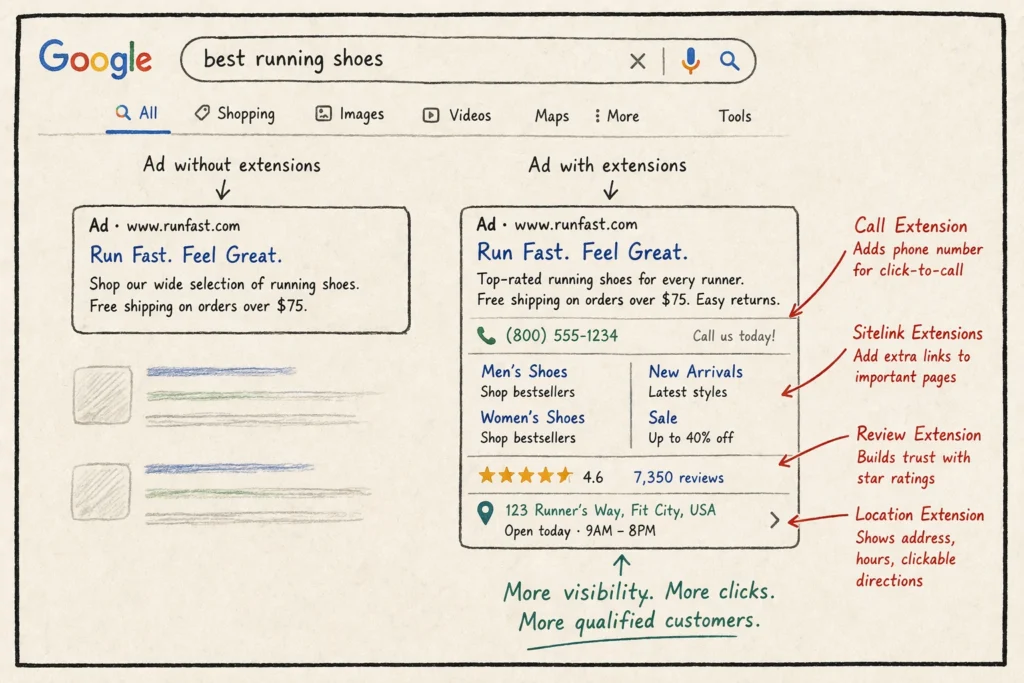
  • Add Ad Extensions: Sitelinks, callouts, and structured snippets give people more reasons to click your listing. Those extra clicks raise your click rate over time, and the rating follows the behaviour.
  • Trim Underperformers: Pause any keyword stuck at three or below for two straight months. Its history keeps dragging the ad group down while you wait for a turnaround that rarely arrives.
  • Fix Page Load Speed: Slow pages on phones cost you conversions and points at the same time. One study from Google found 53% of visits are abandoned when a mobile page takes longer than three seconds. Compress your images, cut redirects, then test the URL again in PageSpeed Insights.

Each improvement addresses a different part of your ad performance, so check the results before moving to the next change. Keep an eye on keyword ratings, click-through rates, and landing page performance to see where progress happens.

Tip: Quality Score is a diagnostic, so changes can take time to appear. With those four in place, most accounts see ad performance move inside three weeks.

Make Quality Score Part of Your Weekly PPC Optimisation Routine

Your Google Ads Quality Scores shift every time the auction runs, so a number you checked last month tells you very little today. A weekly check helps you catch small drops before they become expensive problems.

Add the Quality Score column to your keyword view, sort it low to high, and fix the worst three. Sorting that column does more for your digital marketing results than another round of bid changes.

Ready to stop overpaying for clicks? Talk to us for PPC optimisation and a Google Ads audit that targets the keywords holding your account back.

Google Ads Landing Pages: What Happens After Someone Clicks Your Ad

After someone clicks your ad, your Google Ads landing page must match the ad’s promise and prompt one clear action. Anything else on that screen, such as a full site menu or three competing offers, wastes the money you have already paid Google.

That gap between the click and the conversion is where many advertisers lose budget. Standard reports rarely flag it, because the ad looks healthy while the page loses the visitor. At Wowelle, we often see strong ad copy send expensive paid traffic to pages that answer a different question.

This guide covers ad-to-page wording, layout, load speed and the testing habits that raise your PPC conversion rate. Each section ends with a change you can make this week.
What Makes a Google Ads Landing Page Different From Your Homepage?

Close-up shot of a person's hand holding a smartphone

A page built for ads serves one campaign goal and one user intent. A homepage has to satisfy every visitor at once, including browsers, job seekers and existing customers, so its attention splits across many links. Visitors who click an ad usually expect to find the product, service or answer mentioned in its copy.

Two differences set a dedicated landing page apart from the rest of your website, and both affect what you pay.

Message Match: When Your Landing Page Content Matches the Ad

Message match means your landing page reflects the offer, language and expectations set by your ad. For example, an ad for “same-day mobile repairs” should lead to a page offering that service.

When the wording drifts, visitors spend their first seconds working out whether they have landed in the right place. Many leave instead, and each exit raises your bounce rate and wastes the click you paid for. Nielsen Norman Group research found that many visitors leave a web page within the first 10 to 20 seconds of arriving.

In our account audits, the fastest improvement is rewriting the landing page headline to mirror the top keyword in that ad group. Then check the remaining keywords in the group and confirm each one can match the landing page copy or subheadings. This keeps the promise your ad made and holds attention long enough for the offer to register.

How One Offer Per Page Lifts Your Quality Scores

A focused landing page addresses a specific search intent, which Google considers when assessing landing page experience. That review feeds your landing page experience score, one of three Google Ads Quality Score parts alongside ad relevance and expected click-through rate. If you improve that score, your cost per click can fall over time.

Use separate landing pages when ad groups target different offers or search intents. You will then see which offer produced each lead. If you have ever argued over which ad earned a lead, that clarity justifies the extra build time. Pages built this way also keep every test clean.

Design the Page Around Your Conversion Goal

Woman sitting at a white minimalist desk

Once the page matches your ad, its layout needs to help visitors understand the offer and find the next step. Good landing page design answers three questions quickly: where am I, what do I get, and what happens next.

Two parts of that first screen carry the most weight, so tackle them in order.

Write Landing Page Copy and a Call to Action That Hold Attention

Your headline should explain the value proposition, while the call to action (CTA) shows visitors what to do next. Both should be easy to find near the top of the mobile page.

The wording of your CTA also deserves attention. A CTA like “Get my free quote” tells visitors what they’ll receive, unlike a generic “Submit” button. A shorter form with a name, phone number and one qualifying question also reduces the effort needed to enquire.

However, even a simple form can lose attention when another offer competes with the main CTA. A second offer may help some visitors, but testing can show whether it improves conversions.

Which Trust Signals Win Over Your Target Audience?

Trust signals help visitors judge whether your business can deliver its offer and handle their personal information responsibly. Place relevant customer testimonials near the offer, and use customer names only with permission. Add two short case studies with numbers, then link your privacy policy under the submit button so visitors know how you use their details.

Landing pages that show real client logos and review counts tend to hold visitors longer than pages listing only features. Real reviews persuade better than self-praise. Lead generation pages rely on that trust, so give it room near the form.

Speed and Mobile: How Load Time Drives Bounce Rates

Teenage girl in a coffee shop holding her phone at eye level

Beyond design, a faster page can lift conversions and reduce what you pay for each click on mobile. Mobile visitors may use slower connections, which makes heavy images and unnecessary scripts more noticeable. A Google study found that 53% of mobile visits end when a page takes longer than three seconds to load.

Here are three quick checks to run on your mobile page before you spend another dollar on clicks.

  • Mobile Form Layout: Stack form fields in one column and use the correct mobile keyboard for each input. For example, set phone fields to open a numeric keypad so visitors can enter their numbers without switching keyboards.
  • Tracking Scripts: Chat widgets, heat maps and advertising tags can increase page load time. Review which scripts your team uses and remove unnecessary ones after checking their tracking purpose.
  • Image Weight: Large image files can delay page loading on mobile connections. Compress images, choose suitable file formats and check their displayed dimensions before publishing.

Test the page on your own phone over mobile data, not office Wi-Fi. A phone test can reveal slow-loading images, difficult form fields and buttons that are hard to tap. Fix any problems that prevent visitors from reading the offer or completing the form.

Testing and Landing Page Optimisation for a Stronger PPC Conversion Rate

Once your page looks right and loads fast, A/B testing shows you what visitors respond to instead of what you assumed they would like. Winning pages rarely launch fully formed, so change one element at a time, usually the headline first. That way, you know which edit moved the result.

Set up conversion tracking before you start, so each version reports form completions and phone calls. Compare each version’s conversion rate using the same conversion definitions. Configured Google Analytics events can help identify where visitors leave, while form submissions measure completed enquiries.

For one Sydney trades client, we tested ”Check My Postcode” against ”Request a Quote” to compare form submissions. Give each test enough clicks to mean something, usually a few hundred per version, before you call a winner. Watch landing page performance over a full week, since weekday and weekend traffic behave differently.

From there, feed the winning page back into your Google Ads campaigns and make it the new control for your next test. Retire the losing version once the result holds. Google’s Ads documentation explains landing page experience and how it relates to ad quality.

Ready to Make Your Ad Spend Work Harder?

Your ad spend only works as hard as the page it sends people to, and that page has one job. Match the promise, make one action obvious and let testing prove the result.

Pick your highest-spending ad group and rebuild its destination as a single focused page. Leave the rest of the account alone until you see what that one change does. Track the cost per lead for a few weeks, because each test needs time to collect enough data.

Ready to make every click count? Talk to Wowelle about page design and paid search campaigns built around one clear goal.

How Small Changes in Ad Copy Can Influence Google Ads Results

Small changes in ad copy can lift your click-through rate and quality score, which often lowers your cost per click. Swapping one word in a headline can affect click-through rates across thousands of impressions. That change then repeats across every auction your ad enters.

Many advertisers rewrite a whole ad when performance dips. When every line changes at once, nobody can tell which edit helped and which one hurt. At Wowelle, we see steadier gains from small, tracked tweaks than from full rebuilds.

This guide explains how Google assesses ad relevance, how to write for search intent, and how to test copy changes

Why Do Small Changes in PPC Ad Copy Lift Results?

Marketing professional at a modern office desk reviewing printed

Small Google Ads copy changes can improve relevance, which may help your ad compete for better positions at lower costs. Before an ad appears, Google calculates its Ad Rank. That rank combines your bid with ad quality signals, so your copy affects placement alongside your bid.

Three linked factors respond fastest to a single copy edit: ad relevance, expected click-through rate and cost per click.

How Ad Relevance Affects Your Quality Score

Ad relevance measures how closely your copy matches the search query. Google uses that match as one of three inputs to the Quality Score, which runs on a 1 to 10 scale. The other two inputs are expected click-through rate and landing page experience.

Adding the exact search term to a headline can move ad relevance from “average” to “above average”. On live accounts, we have often seen this happen within a fortnight. A higher quality score usually lowers what you pay for the same position. That means a two-minute edit can keep saving money long after you make it.

How Click-Through Rates Ripple Through Your Account

Google compares your expected click-through rate against rival advertisers bidding on the same keywords. There is no fixed benchmark to beat.

A stronger expected click-through rate improves your auction-time ad quality and helps your ad compete for impressions. Your impression share can climb without a budget rise, as long as your campaign is not already limited by budget.

What One Word Can Do to Cost Per Click

Google sets your actual cost per click using your ad rank and the ad ranked just below yours. A higher quality score lifts your ad rank, so you pay less to hold the same position.

For one of our retail clients, swapping“cheap” for “from $49” lowered the average cost per click within three weeks. The budget and keywords stayed the same throughout that test. Based on that experience, we suggest starting with the headline that receives the most impressions, as improvements there could affect more auctions.

Writing Google Ads Headlines That Speak to Your Target Audience

Copywriter sitting at a wooden desk in an office workspace

Once you know how Google scores ads, look at who your headlines speak to. Many headlines describe the business instead of the person searching. Searchers want prices, availability, or solutions to their problems, rather than a list of company awards

Work through these three shifts, and your headlines will start to sound like answers.

Matching Your Message to Search Intent

Search intent tells you whether someone wants to learn, compare or buy. Each headline should match the stage the searcher has reached. For instance, someone searching ’emergency plumber Brisbane’ likely needs urgent help and a number to call. Someone typing “how much does a plumber cost” is still comparing and wants a price range.

If your headline targets the wrong stage, you may still get clicks, but conversions will drop. Those wasted clicks cost you more than an ad that never gets clicked.

Action-Oriented Language That Earns the Click

Headlines that name the next step may attract more clicks. In our tests, “Book a free quote” usually outperforms “Learn more”. The first tells searchers what they can request, while the second leaves the next step unclear.

Pair an action verb with a specific benefit, such as ‘Compare plans in 60 seconds’. Here, ”Compare” tells readers what they’ll do, while ”60 seconds” sets an expectation for how long it’ll take. This helps searchers decide whether the offer suits their needs before clicking.

To keep that message consistent, match your ad’s call to action with the landing page button. Otherwise, visitors may hesitate or leave when they can’t find what the ad promised.

Using Numbers and Specifics to Sharpen Your Value Proposition

Numbers stand out because rival headlines lean on words like “quality” and “trusted”, and those words blur together on Google Search. For example, “12 years in the trade” or “Free delivery over $99” gives a reader something solid to weigh before clicking.

Specific lines also give responsive search ads stronger assets to test, which leads into the next section.

Effective Copywriting Habits for Responsive Search Ads

Marketing team of three professionals standing at a wall

A few simple habits help your responsive search ads find more winning combinations without extra budget. Google mixes your headlines and descriptions into many combinations, then favours the ones that perform best.

Here is how to give the system better material to work with.

  • Fill All Fifteen Headlines: Supply 15 distinct headlines instead of stopping at the minimum of three. Google’s specs allow up to 15, and more options help the system find a winner.
  • Pin Only When Needed: Pinning locks a headline into a specific position, which reduces the combinations Google can test. Use it when legal wording, disclaimers or required brand messages must appear in a certain position. Otherwise, leave headlines unpinned so Google can test different arrangements.
  • Write Varied Descriptions: Each description should add information the headline hasn’t covered, such as delivery times, guarantees or booking details. For example, pair “Free Delivery Over $99” with “Order before 2 pm for same-day dispatch” if the business offers it. This gives searchers another reason to consider your offer without repeating the headline.

Ultimately, treat ad strength as a to-do list rather than a grade. Fixing each weak asset Google flags usually takes less than 10 minutes.

Google Ads Testing: Measuring Which Small Changes Lift Ad Performance

Once your assets are in place, testing shows you which small changes are worth keeping. For a simple A/B test, change one element at a time so you can identify its effect.

This quick reference pairs each type of edit with the metric that answers it.

What you changeMetric to watchWait before judging
Headline wordingClick-through rate2 weeks
Call to actionConversion rate3 weeks
Description detailImpression share4 weeks

Conversion rates need the longest run of all, because they rest on far fewer events than clicks do.

Run one test per ad group using Google Ads experiments, and record the start date. Patience beats guesswork here, because early data swings wildly on low click volume.

Small Edits, Stronger Google Ads Performance

Tiny edits compound over time. Accounts that change one headline each fortnight often outperform accounts that rewrite everything at once. Steady, tracked copywriting gives you clear data that a full rewrite never can.

Start with your highest-spending ad group, then test its top-impression headline first. A small lift there returns the most money. After that, work through your other ad groups one at a time.

Want more from your ad budget? Talk to Wowelle about Google Ads copywriting and campaign management built on tested, measurable edits.

Business owner planning online advertising

How to Decide Between Hiring an Agency or Managing Ads Yourself

If you’re running Google Ads for your business, you’ve probably asked yourself this at least once. Should I hire someone to handle this, or can I keep doing it myself?

That’s the Google Ads agency vs DIY debate, and it comes up with almost every small business owner we talk to. Budget is part of it, but your available time and PPC experience will influence that decision just as much.

Our team at Wowelle has managed ad campaigns for Brisbane businesses across dozens of industries, so we’ve watched both paths play out firsthand. This guide covers what each option looks like day to day, where DIY ads hit a wall, and how to tell which path fits your business goals.

Google Ads Agency vs DIY: What Are You Really Choosing Between?

Comparing agency and DIY advertising

The choice between hiring a Google Ads agency and doing it yourself comes down to two things: how much time you have and how fast you need results. And honestly, the answer looks different for every business.

Both options can work, but they ask for very separate commitments from you. Here’s what each side looks like up close.

What a Google Ads Expert Brings to the Table

When you hire an agency, you get a Google Ads expert who manages your campaigns full time. That means someone is adjusting bids, reviewing your ad spend, and tracking your target audience daily. Their deep expertise with the platform helps them catch wasted spend early, often before you’d even notice it in your account.

Agencies also bring auction insight reports and competitor data that most business owners can’t access solo.

What Managing Campaigns Yourself Looks Like

Running your own PPC campaign means logging into Google regularly to check what’s working and what isn’t. You’ll handle everything from setting your advertising budget to choosing who sees your ads.

It’s time-consuming, and the early learning curve is steep (one wrong match type setting can drain a week’s budget overnight). But if you have the hours to commit, managing campaigns yourself does give you full control over every dollar.

Now, let’s look at where that DIY confidence starts wearing thin.

Where DIY Google Ads Start to Break Down

Reviewing ad campaign performance

Most business owners launch their own DIY Google Ads with confidence. The trouble usually hits around month two, when the small tasks start stacking up, and your current campaigns need more attention than you planned for.

These three areas tend to break down first.

  • Keyword Research Piles Up Weekly: You’ll need to review search term reports, sort through new keywords, add negative keywords, and organize your ad groups on a regular cycle. Miss a week or two, and your ads begin showing for searches that have nothing to do with your business.
  • Bid Management Requires Daily Attention: Your bidding models need adjustments based on competition, time of day, and device performance. This isn’t something you can set and walk away from. Every dollar spent on a poorly timed bid chips away at your quality score with no return.
  • Budget Allocation Drains Your Google Ads Account: Without clear data, most advertisers spread budget evenly instead of pulling money from underperforming campaigns and feeding their top performers (it’s easy to keep funding what’s familiar instead of what’s working). That’s the real opportunity cost of DIY, because you end up chasing vanity metrics instead of profitable results.

After working with dozens of Brisbane businesses on their ad accounts, we’ve seen these exact breakdowns in nearly every DIY setup we’ve audited.

Once you see those gaps, the next question is what the alternative looks like.

What Effective PPC Management Looks Like With an Agency

Marketing team reviewing PPC campaigns

The main advantage of working with an agency is that someone else takes the daily workload off your plate while you focus on running your business.

Effective PPC management covers far more than clicking buttons in a dashboard, though. It means having a team that can fine-tune your campaign goals, track conversions, and continuously test what’s working to maximize ROI.

Let’s walk through two areas where agency teams tend to pull ahead.

Tracking Campaign Performance and Testing New Channels

Agencies review campaign performance weekly using dashboards that connect ad data to lead generation and revenue. They track key metrics like cost per conversion, audience behaviors, and click-through rate instead of vanity numbers that look good but mean nothing.

In our experience, the accounts that get regular check-ins catch budget leaks way before they become expensive. Yet, most business owners never get around to this part on their own.

Google Partners-certified agencies also test new channels like YouTube, Display, and different ad formats to find new audiences. That commitment to expanding reach and audience segmentation is how they maximize results across the full customer journey.

From there, the question becomes where those clicks land.

Why Landing Pages Get More Attention From Agency Teams

Believe it or not, the ad is only half the job. Landing page optimization is where agencies push for the highest conversion rates, because a great ad means nothing if your page doesn’t convert.

AreaDIY ApproachAgency Approach
Page TestingOccasional tweaks when something feels offOngoing testing of headlines, layouts, and forms
Ad-to-Page AlignmentOften mismatched messagingCopy mirrors the exact ad promise
Performance TrackingBasic analytics reviewActionable insights tied to geographic targets and campaign goals

Agency teams align page messaging with ad copy so visitors see exactly what they expected after clicking.

Small adjustments to headlines, forms, and page speed often improve performance without increasing ad spend (even something as small as a headline tweak). That combination of ongoing testing and data-backed changes is how agencies deliver profitable results consistently.

Making the Right Google Ads Decision

PPC is an evolving art, and there’s no such thing as perfect optimization. Your ppc needs will shift as your business grows. Maybe you’re a high-end fashion retailer expanding to Bing Ads, or a local Brisbane shop tightening your advertising spend on Google alone. Either way, the question is the same: can you keep up on your own?

Our Google AdWords Tips are a good place to start. And when you’re ready for a team to take over, Wowelle is here to help you turn your ad budget into steady returns.

How to Structure Google Ads Campaigns for Better ROI

How to Structure Google Ads Campaigns for Better ROI

Tight ad groups, clear tracking, and matching landing pages increase your Google Ads ROI fastest. Most accounts struggle because the structure underneath is messy, even when the ads are strong.

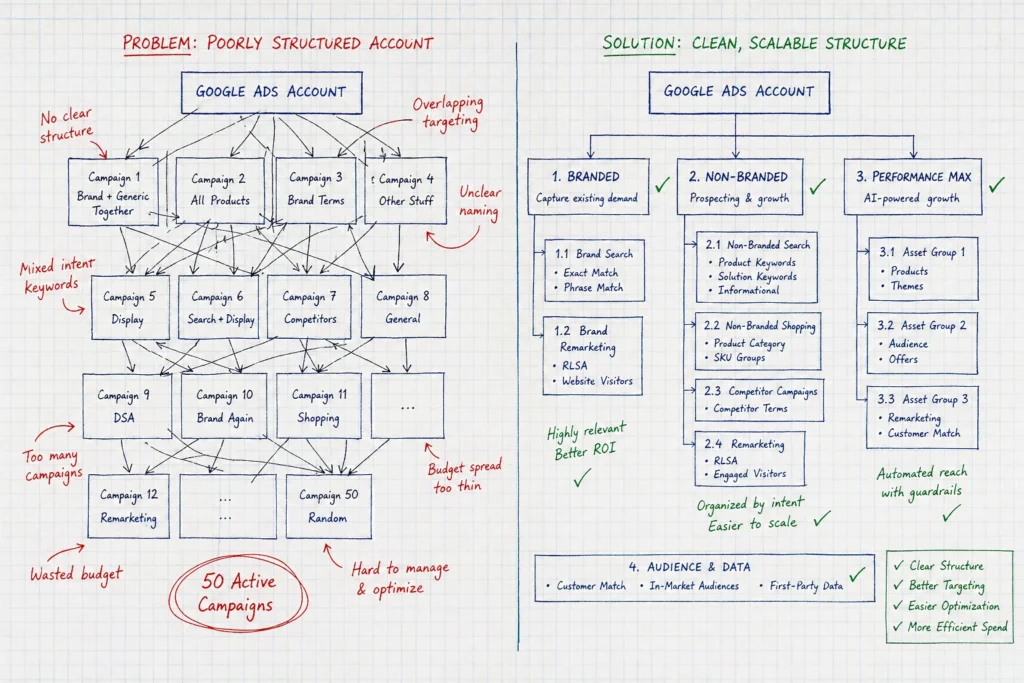
That said, a cluttered account spreads your budget across the wrong keywords and the wrong audiences. It means higher costs per click and fewer conversions for the same spend. Good layout fixes this by keeping every campaign focused on one clear goal.

In this article, we’ll walk through how to build a solid Google Ads setup and avoid the most common setup mistakes. We’ll also show you how to get more conversions from your existing budgets. Read on for a clear plan to improve your Google Ads framework.

What Is Google Ads Structure and What Does It Mean?

Google Ads layout is how you organize your account, campaigns, and ad groups. It controls your targeting and spend. If you get your account structure right from the start, you’ll make every other Google Ads decision with far more confidence.

Here’s a closer look at what makes up that configuration and why it outlines your results:

Google Ads Account, Campaigns, and Ad Groups Explained

Your Google Ads account sits at the top and holds your billing information. Within your account, campaigns control your budget, targeting, and campaign goals. Each campaign is then divided into ad groups, which organize closely related keywords and ads.

Think of it as three layers: account, campaign, and ad group. Each one is nested inside the last. This setup keeps your keywords organized and your ads relevant to what people search for.

Get these three layers right from the start, and you’ll save hours of cleanup later. It also makes future changes far easier to manage.

How Campaign Configuration Affects Performance

How Campaign Configuration Affects Performance

Loose setup spreads your spend across keywords and ads that don’t relate to each other. That drags down your quality score and pushes up your cost per click. We’ve seen accounts cut their cost per click in half just by tightening up ad groups.

On the flip side, a well-defined framework does the opposite. It groups similar keywords together, so your ads and landing pages match what people typed into Google. That relevance is exactly what improves your campaign performance over time.

Once your layout is solid, every other part of the account works stronger too. Bidding, targeting, and budget all fall into place faster.

Building Your Campaign Structure Step by Step

Most accounts fail on organization long before the ads or keywords become the problem. A solid setup comes from a few deliberate steps rather than guesswork. Instead of overhauling your entire account, begin with one campaign and refine it first.

With that in mind, let’s break down each step so you know where to focus first:

Setting Up Ad Groups the Right Way

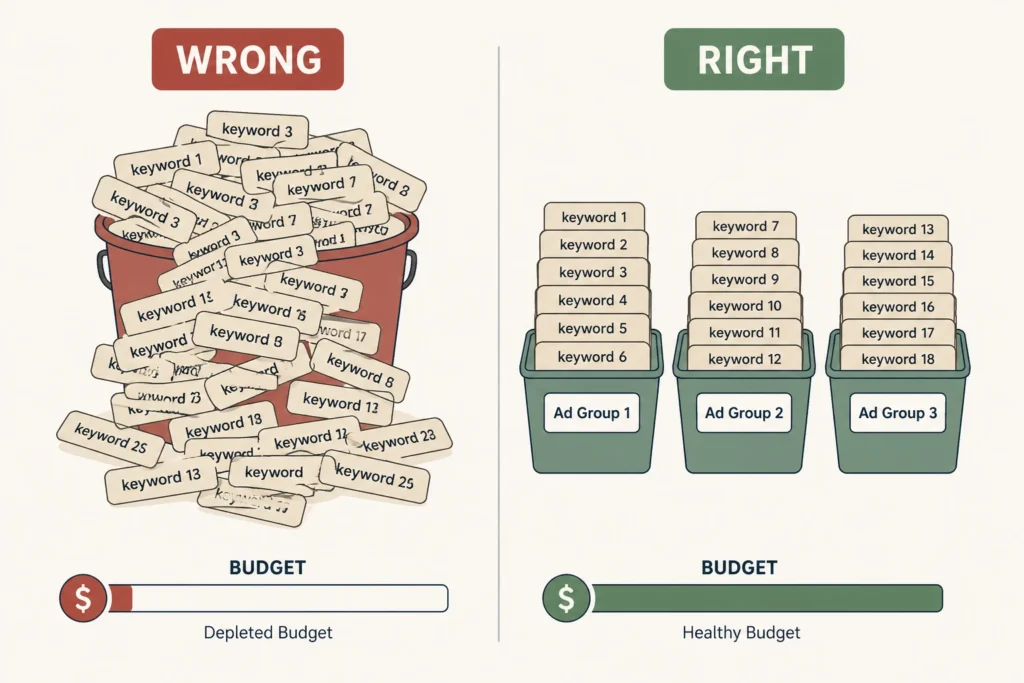
It’s best to group your keywords by refined themes rather than broad categories. Funds disappear in broad groups because Google spreads your spend across searches that don’t convert. Aim for 5 to 20 closely related keywords per ad group.

Next, match each ad group to its own ad copy and landing page. This keeps your message consistent between your ad and landing page. When everything lines up, potential customers know they’ve landed in the right place.

Focused ad groups make it easier to track which keywords bring in the most conversions. That clarity helps you shift more of your budget toward the ads and keywords that perform best.

Match Types: The Setting Most People Get Wrong

Broad match reaches the widest audience, but it wastes the most budget. Phrase and exact match narrow your targeting to searches with clearer intent. In our own campaigns, tightening match types cut wasted spend within the first month.

That said, most accounts do best with a mix of match types. Broad match can help you discover new audiences, while exact match protects your ad dollars on proven keywords. Negative keywords also help filter out searches that waste your spend.

Either way, getting match types right takes some testing, but the payoff shows up quickly in new audiences reached and conversions.

Does Your Ad Copy Match the Layout?

Does Your Ad Copy Match the Layout?

Your ad copy should mirror the keywords inside that specific ad group. If someone searches for “running shoes for flat feet,” your ad should say exactly that. That’s because generic copy loses the relevance your precise setup just built.

In fact, relevant copy raises your click-through rate and quality score together. Google rewards ads that match search intent with lower costs per click. It’s a direct win for your overall ad spend.

With that in mind, test two or three ad variations per group to see which performs best. Small wording changes can shift your click-through rate noticeably.

Can the Right Structure Improve Your Google Ads ROI?

Yes, focusing your campaign framework directly improves ROI. It makes your tracking, targeting, and spend far more accurate. Once tracking is precise, every other decision in your account becomes more data-driven.

For that, have a quick look at the configuration elements that influence ROI the most.

Conversion Tracking and Campaign Performance

Conversion tracking shows you which ad groups bring in leads or sales. Otherwise, you’re making account spend calls based on guesswork instead of real data.

The following elements have a significant impact:

Structure ElementROI Impact
Conversion tracking accuracyReliable data for budget decisions
Ad group segmentationEasier to spot which groups drive sales
Negative keyword listsLess wasted spend on irrelevant clicks

Before making any major changes, set up tracking first. If you use target CPA (Cost Per Action) or ROAS (Return on Ad Spend), accurate conversion value data keeps your bidding strategy on point.

Landing Pages: The Overlooked Piece of the Puzzle

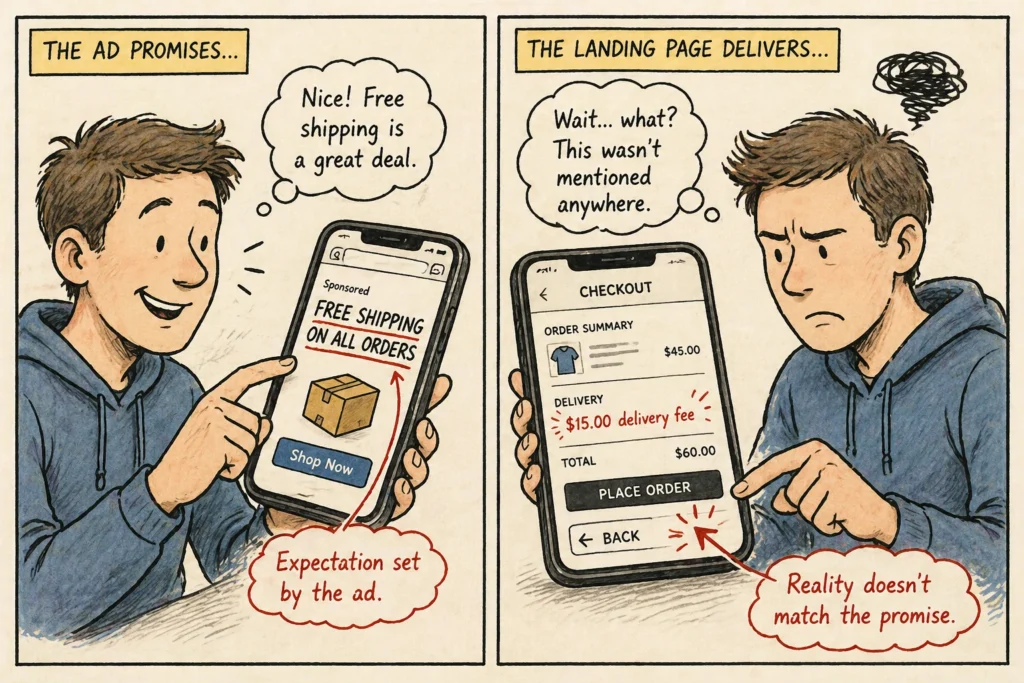
Your landing page needs to match the intent behind the ad group’s keywords. A mismatched page increases bounce rate and hurts your quality score. Google notices when your ad promises one thing, and the page delivers another.

E-commerce businesses especially feel this gap. One irrelevant page can sink an entire campaign’s conversion rate, even when the ad itself performs well.

A dedicated landing page for each major ad group keeps visitors on track. Fast-loading pages with a clear call to action convert more of that traffic into leads or sales.

Common Mistakes That Wreck Campaign Performance

Common Mistakes That Wreck Campaign Performance

Even well-funded accounts fail due to structural mistakes instead of weak ads. The best part about knowing these mistakes upfront is you can fix them before they drain your budget. Chances are, at least one of these is sitting in your account right now.

To reduce wasted spend, here are the mistakes that show up most often.

Structural Mistakes That Cost You Budget

Mixing unrelated keywords into one ad group confuses both Google and your customers. That mismatch drags down your quality score across the board.

On top of that, running too many overlapping campaigns splits your own ad dollars against itself. This often happens at the campaign or account level, where teams launch new campaigns without checking for overlap.

Both issues are fixable. Cleaning up overlapping campaigns and reorganising unrelated keyword groups can free up wasted spend. Most accounts notice the difference within their first billing cycle.

Fixing an Underperforming Google Ads Account

Start by auditing your ad groups and splitting broad themes into streamlined, specific groups. This alone often improves performance within a few weeks.

After that, pause keywords that aren’t converting and shift that budget toward your best performers. Rebuild landing pages so they match your strongest ad groups first.

Advertisers who focus their strategy here tend to see the fastest gains. Small, consistent fixes like this beat a full account overhaul every time.

Ready to Rebuild Your Google Ads Structure?

A tighter Google Ads structure means better tracking and stronger returns on every dollar you spend. We’ve seen clean ad groups and well-matched landing pages reduce wasted spend and improve campaign performance. So, build a solid layout first, and the rest becomes much easier to manage.

To get started, audit your ad groups and match types this week. That single change often uncovers the quickest opportunities for improvement. Set up your conversion tracking next so that future decisions rely on real data rather than guesswork.

Finally, pick one campaign today and put these changes into practice, or let the Wowelle team handle the audit for you. Either way, you’ll have a clearer view of what’s working and where to improve next.

Can AI-Powered Campaigns Help You Generate Leads Faster?

Why Google Ads Still Delivers Leads When Other Channels Slow Down

Most marketing channels slow down at some point. Social reach dips, organic rankings shift, and referral traffic dries up without warning. Google Ads tends to hold steady through all of it, since it runs on intent rather than algorithms or luck.

Stable performance becomes even more valuable during slow seasons, when businesses can’t afford to wait around for traffic to pick back up. That’s also why relying only on organic growth leaves you exposed the moment a platform changes its rules.

In this article, we’ll explain what sets Google Ads apart from other marketing channels and how it performs when budgets are tight. We’ll also cover AI-powered campaigns and where Google Ads fits into a broader marketing strategy. Let’s get into it.

What Makes Google Ads Different From Other Marketing Channels?

Google Ads puts your business in front of people who are already searching for what you sell. That’s the core difference between paid search and almost every other digital channel out there.

The first thing to understand is why Google Ads works differently from most forms of digital marketing.

Paid Search Puts You in Front of Potential Customers Instantly

Google Ads shows up the moment someone types in a relevant search term. There’s no waiting period or algorithm deciding whether your business deserves visibility that day.

Compare that to SEO, which can take months of content creation and backlink building before you see any movement in search engines (and most Brisbane business owners don’t have that much time to spare). The ranking process is slow by design, since Google needs time to trust a new page.

This speed helps most when a business needs leads quickly. So naturally, if business turns sluggish and you need traffic now, organic search just can’t keep pace.

Other Channels Depend on Timing, Algorithms, and Luck

Other Channels Depend on Timing, Algorithms, and Luck

Social media ads work differently from paid search, since your reach depends entirely on a platform’s algorithm that day. One week, thousands of people see your posts, and the next week, barely anyone notices.

Referral and organic traffic follow a similar pattern, dropping the moment seasonal interest fades or your rankings shift. In fact, based on our observations, campaigns lose half their traffic overnight from a single Google update.

Google Ads stays consistent through all of this because you control your ad spend, audience targeting, and timing directly. No algorithm change can take that control away from you.

How Campaign Performance Holds Up When Budgets Get Tight

Campaign performance holds steady when targeting and bidding stay focused, even during tight budgets. That consistency is what keeps Google Ads reliable, even when businesses cut other marketing activities first. A smaller budget doesn’t have to mean fewer leads.

Cost Per Lead Stays Steady With the Right Setup

Proper keyword targeting and wise bidding keep your cost per lead (CPL) from swinging wildly month to month. One important point that often gets overlooked is testing your bid strategy before scaling spend further.

A few factors drive that cost more than anything else:

  • Bid Strategy: Manual or automated bidding determines how much you pay for each click. The suitable approach helps control costs while keeping your ads competitive in the auction.
  • Quality Score: A stronger match between your keywords, ad copy, and landing page can improve your Quality Score. Higher scores often reduce your cost per click, which allows your budget to generate more qualified leads.
  • Competition Level: More businesses competing for the same keywords usually increase the cost per click (CPC). In many cases, niche or long-tail keywords provide stronger value, especially in highly competitive industries.

If you get these three factors right, your cost per lead stays predictable enough to plan a real budget around.

What a Solid Google Ads Setup Looks Like

Strong keyword targeting and clear ad copy form the foundation of any campaign that performs well. Skip that groundwork, and even a generous advertising budget won’t generate qualified leads consistently.

Your bid strategy also affects how often and where your ads appear on the search results page (small tweaks basically move the needle here). A slightly higher bid on your top keywords can mean the difference between page one and page two.

That said, a well-structured setup naturally keeps cost per lead in check. Once that foundation is solid, the next question becomes how fast AI-generated campaigns can build on it.

Can AI-Powered Campaigns Help You Generate Leads Faster?

Can AI-Powered Campaigns Help You Generate Leads Faster?

AI-powered campaigns speed up lead generation by adjusting bids and targeting automatically, without you having to step in constantly. That speed shift is changing how fast businesses see results from paid search.

Let’s look at how AI speeds up campaign management and why your landing page still determines the final outcome.

AI-Powered Campaigns Adjust Bids and Targeting in Real Time

These campaigns analyse performance data and adjust bids automatically as new signals come in. In our experience, they respond much faster than manual bidding, adapting to customer behaviour in real time.

Google’s machine learning also identifies patterns human managers might miss entirely (like which time of day brings in the most qualified leads). It catches small shifts in click-through rate that a human manager would likely miss.

That said, a well-planned strategy remains essential. This technology still needs clear campaign goals and the right negative keywords to avoid wasting ad spend on the wrong searches. In case you’re confused, you can learn more about common Google Ads mistakes to avoid.

Your Landing Page Still Decides Whether Leads Convert

Even the slickest campaign fails if the landing page disappoints visitors once they arrive (great ads send traffic to painfully slow pages more than once). Speed and clarity are important just as much on your side as they are on Google’s.

Several key factors have the greatest impact:

  • Load Speed: Pages that take more than a few seconds to load lose interested prospects fast. Even a slight delay can increase bounce rates before visitors have a chance to see your offer.
  • Clear Offer: Visitors should understand what you’re offering within the first few seconds on the page. If the value isn’t immediately obvious, many will leave instead of exploring further.
  • Simple Form: A short lead form submission process converts more effectively than one with too many fields. Remember to ask only for the information you need, as every extra field creates another reason to abandon the form.

Pair your campaign with the landing page, and the leads your campaign generates have a chance to convert. This leads to a broader question: how does this all fit into your overall marketing strategy?

Building a Marketing Strategy That Supports Your Business Goals

The best part about a solid marketing strategy is how it ties every channel back to your business goals instead of treating each one separately. In fact, Google Ads works best when it supports the larger picture rather than running on its own.

Here’s how to tell what’s working and when your Google Ads strategy needs attention:

Using Analytics Tools to Track What Is Working

Using Analytics Tools to Track What Is Working

Analytics tools show you exactly which keywords and ads generate leads, instead of leaving you to guess based on gut feeling. That kind of visibility changes how you spend your advertising budget going forward.

Tracking conversions helps businesses adjust strategy instead of guessing blindly, and Google Ads integrates directly with platforms like Google Analytics to make that tracking simple. Honestly, guessing is the fastest way to burn through a budget with nothing to show for it.

Comparing performance against industry averages also tells you whether your numbers are genuinely solid. For example, a 3% conversion rate might sound low until you learn the industry average sits at 2%.

Signs It’s Time to Adjust Your Google Ads Strategy

Not every dip in results means your campaign has failed, but a few warning signs are worth watching closely.

Warning Sign

What It Looks Like

Rising Cost Per Lead

Your cost per lead climbs without bringing in more leads to show for it.

Dropping Conversion Rates

Traffic stays steady, yet fewer visitors turn into paying customers than before.

Stale Ad Content

Your ad copy or keywords haven’t changed in months, even as customer behavior shifts.

Catching these signs early gives you time to adjust before a small dip becomes a problem. A quick review of your campaign every few weeks usually catches most of this before it gets serious.

Ready to Turn Slow Months Into Lead-Generating Months?

Google Ads often remains effective even when other marketing channels become less predictable. Cost per lead, AI-powered campaigns, and landing page fundamentals all work together to keep your leads flowing.

These basics create a solid benchmark for future decisions. Instead of making changes based on guesswork, you’ll know where your campaign stands and what deserves attention first.

Wow Elle has helped plenty of businesses overcome slow months and generate their best results yet. If you’re ready to see what your Google Ads campaigns could be doing for your business goals, let’s talk through your next move.

google ads vs seo

Google Ads vs Organic Search: Where Should You Invest First

Every Brisbane business owner hits this question at some point. You’ve got a set budget, you want to bring in more customers, and the advice starts coming from all directions. Someone tells you to run Google Ads, and others tell you to invest in digital marketing through SEO. So which one do you pick?

Well, it depends on what you need and when you need it. Paid traffic gets you in front of people fast, but organic traffic builds something that keeps working without a cost on every click.

This guide breaks down both channels so you can figure out where your money works hardest for your goals right now.

Google Ads vs SEO: What Is the Difference?

Google Ads puts your business at the top of search results instantly by paying per click, while search engine optimisation builds organic rankings over time through content and keywords.

With paid ads, you pay Google every time someone clicks your link. Your ad shows up on the search engine results page above the free listings. However, the moment you stop paying, your spot disappears.

SEO works in a completely different way. Instead of paying for visibility, you build it over time through quality content, a well-structured site, and strong backlinks. It usually takes longer to see results, but once it starts working, you won’t have to pay for every click that comes in.

How Google Ads Work

How Google Ads Work


The best part about Google Ads is that you can start driving traffic on the same day you launch. That kind of speed makes it a strong option for businesses that need quick wins, especially when paired with a well-optimised Google Business Profile. Let’s break down how it all works.

Your Budget, Your Visibility: How Bidding Works

Google Ads runs on a pay-per-click model. You bid on search terms your target audience is already using, and Google runs an auction every time someone searches.

The winner is decided by two things: your bid amount and quality score. Ad relevance and landing page quality also affect where your ad appears in search results.

These factors often separate a well-managed PPC campaign from one that wastes budget without results. You can learn more about common Google Ads mistakes to avoid.

What Happens When You Stop Spending?

Honestly, paid advertising follows a different approach compared to SEO. The moment you pause your paid campaigns, ads vanish, and traffic drops with them. As a result, every visitor you gain through paid traffic comes at a direct cost to your ad spend.

For short-term goals or product launches, that trade-off is totally fine. As a standalone long-term plan, though, it gets expensive very quickly.

Ultimately, Google Ads gives you control and speed, but it works best when you have a clear goal and a budget you can sustain.

Organic Search and SEO: The Digital Strategy of Keyword Data

What if your website kept bringing in traffic every single day without you spending a cent on ads? That’s what a good SEO strategy can do for your business over time.

Here’s how it all comes together.

Keyword Research and Content Marketing: Where SEO Begins

Organic Search and SEO: The Digital Strategy of Keyword Data


SEO starts with keyword research, which means figuring out exactly what your audience types into Google. From there, you create keyword-relevant content, and that user-generated content feeds your overall content marketing plan to pull in organic traffic.

The payoff is worth the effort. When you create content that answers real questions, Google rewards you with stronger visibility and steady traffic over time.

Can You Combine SEO and Paid Search?

Absolutely, and many businesses do. Run organic and paid channels side by side to gain immediate visibility through ads while your organic SEO rankings build over time. Paid campaign data also shows which keywords convert best.

Feed those findings into your SEO efforts, and your whole strategy gets sharper. Many QLD small businesses start this way, and it likely works well.

By contrast, organic search optimisation takes patience, but the traffic it brings in doesn’t come with a cost for every click.

Speed vs Staying Power: Which Channel Wins?

The answer depends on what your business needs most, either quick visibility or long-term growth. Google Ads delivers quick results, while SEO builds momentum that lasts well beyond the initial effort.

To understand how each channel supports your growth, take a closer look at how they move your business forward:


Google Ads

SEO

Speed

Results within hours

Takes 3-6 months

Cost

Pay per click, ongoing

Time investment upfront

Longevity

Stops when budget runs out

Builds over time

Generate Leads

Immediate

Gradual

Keyword Data

Available instantly

Builds over time

Website Visitors

Paid, consistent

Free, compounding

Marketing Efforts

Ongoing spend required

Compounds with time

The table makes one contrast pretty clear. Google Ads wins on speed, and SEO wins on longevity. Your paid traffic gets you in front of website visitors quickly, but organic and paid together give you the most balanced marketing effort over time.

So the final decision depends on where your business is right now and what you need most.

Matching the Channel to an Effective Digital Marketing Strategy

The right channel choice saves you money, time, and a lot of frustration down the road. The best option depends on your goals, budget, and timeline. Most businesses land in one of these situations:

  • New Business, Fast Results: Google Ads suits you best when you need to generate leads quickly. A focused paid campaign puts your business in front of potential customers within hours of launching, which is hard to beat when you’re just starting out.
  • Long-Term Growth, Lower Costs: SEO works best when you can play the long game. Over time, a strong organic strategy builds slowly, and your cost per lead gradually decreases as rankings improve.
  • Tight Budget, Big Goals: Organic SEO is worth prioritising when ad spend is limited. Although it takes time to build, each ranking page can continue driving traffic without ongoing cost per click.
  • Established Brand, Full Funnel: Once you have some traction, combining SEO and paid ads creates a complete strategy. It helps you capture attention early and stay visible through every stage of the customer journey.

The channel you pick should match where your business is today. Start there, and adjust as you grow.

The Most Effective Move: How to Combine SEO and Google Ads

The Most Effective Move: How to Combine SEO and Google Ads


Most businesses treat these two channels as an either/or decision, but a cohesive strategy uses both. Your paid campaigns generate instant traffic while your organic rankings grow in the background. That balance covers your short-term results without ignoring long-term visibility.

The main advantage comes from your keyword data. Ad performance tells you which search terms convert, and that feeds directly into your SEO strategy. You can then start building content around what will work.

On top of that, email marketing fits naturally into the mix. Once both channels bring visitors to your site, personalised communication helps you nurture leads and keep those people coming back.

And Google Analytics ties it all together. It shows where your traffic comes from and which digital channels pull their weight.

So, Where Should You Invest First?

If you need leads within weeks, start with Google Ads.

New businesses with a tight budget do well starting with paid campaigns. You get quick data, swift traffic, and clear feedback on what works. Gradually, you can build your customer engagement alongside it and reduce your reliance on ad spend.

On the other hand, businesses with more time and budget flexibility are better suited to starting with SEO. While results take longer to build (usually 3 to 6 months), website traffic grows over time and helps reduce your cost per lead as organic rankings improve. In the meantime, targeted paid advertising can help fill the gap and drive steady traffic.

Either way, the goal is a digital marketing setup that doesn’t depend entirely on one channel. So start where your budget and timeline allow, and grow from there.

Your Next Step Starts Here

Both Google Ads and organic search play an important role in a strong marketing strategy. Businesses that achieve consistent online success don’t treat them as separate or competing channels. Instead, they combine both into one cohesive digital strategy.

Your budget, timeline, and goals all point toward the right answer. It just takes someone who knows your business well enough to help you find it. That’s what Wowelle does.

Our team helps Brisbane businesses build digital marketing plans that get results using paid ads, organic search, or a mix of both. If you’re ready to stop guessing and start growing, reach out to the Wowelle team today for a free strategy chat.

Google Ads Mistakes

What Beginners Get Wrong When Running Google Ads

Beginners waste money on Google Ads by ignoring search intent, creating messy campaign structures, and using broad match types without proper control. In fact, most people don’t notice these mistakes until they have already spent hundreds or thousands of dollars.

And worst of all, Google Adwords won’t tell you what went wrong here. Your ads keep running, clicks keep coming in, but conversions do not follow. As a result, you end up questioning your PPC campaign while Brisbane businesses down the street continue generating results.

We’re breaking down the most common Google Ads mistakes beginners make, so you can fix them early. Plus, you’ll learn how to fix your ad campaigns, save money on wasted spend, and actually get new customers from your ads.

Google Ads Mistakes That Kill Your Budget Fast

Your ad budget disappears in days, and you have no idea where the money went. This doesn’t happen randomly.

In most cases, a few common mistakes are behind it. Let’s break down each one so you know exactly what’s draining your budget.

Why Search Intent Ruins Your Ad Performance

It often starts with a mismatch between what your ads promise and what people are actually searching for. For example, your ad copy might say “cheap plumbing repairs,” but search intent shows people need emergency services right now. So when the message does not match what users expect, they click and leave immediately.

As a result, mismatched keywords send the wrong traffic to your landing pages, which leads to wasted ad spend on clicks that never convert (and trust us, we’ve watched clients burn $5,000 learning this the hard way). You’ll also end up paying Google for visitors who leave within seconds because your ad relevance is off.

Over time, this shows up clearly in your data. When you check your Google Analytics search results, the pattern becomes obvious: high clicks, poor conversions, and a drained budget.

Too Many Ad Groups Equals Wasted Budget

Too Many Ad Groups Equals Wasted Budget

Another issue comes from how campaigns are structured. If you stuff 20 keywords into one ad group, it quickly destroys your quality score and ad relevance. Because Google AdWords rewards tight, focused ad groups where every keyword aligns with the same search intent.

To support this, each ad group needs tight keyword research with 5–10 closely related search terms. This keeps your ads sharp and your landing pages relevant to keep your PPC on track.

Spreading your monthly budget too thin across multiple ad groups creates another problem. With a limited budget per campaign, Google cannot gather enough data to learn what works. So, you end up with 15 campaigns getting $3 per day instead of 3 campaigns getting $15.

Your Search Terms Report Shows the Real Story

Even with the right structure, performance can still drop if you ignore your data. Most beginners never check which exact search terms brought up their ads, so they keep paying for irrelevant traffic.

You can solve this issue by checking the search terms report in your Google Ads account. This report will show you what people actually typed before clicking your ad. This will help you narrow your keyword focus.

From there, adding negative keywords helps to stop irrelevant clicks and can save a large amount of ad spend immediately. For example, your “Brisbane plumber” ad might show up for “Brisbane plumber salary” or “Brisbane plumber jobs.” Those clicks cost money but bring zero customers.

In addition, search partners often bring in low-quality traffic that your search terms report will highlight quickly. If the data shows poor performance, turning off search partners can project your budget.

At the end of the day, your job is to make sure every dollar in that ad spend works for you.

Campaign Structure Problems Nobody Talks About

Campaign Structure Problems Nobody Talks About

A well-structured campaign reduces wasted budget from the start. And once the major issues are addressed, the underlying problems become even more visible.

Here are the structural problems killing your Google Ads campaigns right now.

  • Mixed Intent Campaigns: One of the most common issues appears when campaigns mix different types of search intent. Many beginners place “buy running shoes” and “running shoe reviews” in the same Google Ads campaigns. However, these searches reflect completely different goals, so your ads struggle to perform effectively.
  • Performance Max Without Tracking: Without conversion tracking, Google has no direction and ends up draining your budget (unless you enjoy gambling with your marketing budget). Based on audits of over 200 Google Ads accounts in Brisbane, we’ve seen this issue appear in nearly 60% of them.
  • Branded vs Non-Branded Together: Your Google Ads account needs separate search campaigns for each type. Because someone searching your brand name is ready to buy, while generic searchers require different automated bidding strategies and target CPA settings.
  • Too Many Active Campaigns: As accounts grow, another issue begins to surface. Some account managers tend to run 50 campaigns in parallel. At that scale, it becomes difficult to monitor PPC performance or manage bids effectively, which leads to missed issues.
  • Bidding Without Conversion Data: Even with the right structure, bidding can fail without enough data. In practice, target CPA strategies need at least 30 conversions per month. Without that volume, Google AdWords cannot learn what works and ends up spending inefficiently.

Pro Tip: To bring everything back under control, focus on 3–5 high-performing campaigns, and fund them properly with your monthly budget. Gradually, you’ll start to see your PPC campaign numbers improve.

Landing Pages vs. Ad Copy: The Disconnect

Landing Pages vs. Ad Copy: The Disconnect

People click your ad, land on your page, and leave in 3 seconds flat. This happens when your ad copy and landing page do not match, even if each one performs well on its own.

This disconnect shows up in real campaigns like this:

What Your Ad Says What Your Landing Page Shows 
Free shipping on all orders $15 delivery fee at checkout 
 Blue running shoes on saleGeneric homepage with no shoes visible 
 Mobile-friendly shopping experience Desktop layout broken on mobile devices
 “Click here to get started.”Confusing navigation with no clear CTA 

We see this intent mismatch almost daily, where someone clicks “blue running shoes” and lands on a page showing everything except blue running shoes.

When that happens, Google responds quickly by dropping your quality score. And your Cost Per Click (CPC) increases and your ad position falls on the search results page.

Different Match Types Control Your Spending

Now that you know the structural mistakes, let’s talk about various match types and how to control your spending in real campaigns.

When Broad Match Becomes a Money Pit

Broad match keywords with low search volume bring in thousands of irrelevant search results that nobody wants. You bid on “plumber Brisbane,” and your ads show up for “plumber jobs Brisbane” or “plumber salary Brisbane.” But none of those searchers need your services.

This happens because Google AdWords interprets broad keywords however it wants, often showing ads for unrelated search engine queries. That’s why this match type needs constant supervision.

Without tight negative keyword lists, the problem gets even worse. It burns through money faster than most other Google Ads mistakes. To stay ahead of this, you should check your search terms report weekly; only then will you catch the worst offenders before they drain your ad budget.

Why Phrase Match Saves You From Irrelevant Clicks

Phrase match gives you better control over search terms while still capturing useful variations that an exact match might miss.

In practice, your ad shows up when someone types your exact phrase along with additional words before or after it. This keeps your reach flexible without opening the door to completely unrelated searches.

That shift also impacts costs. Switching from broad match helps reduce unnecessary spending while keeping lead flow steady. At the same time, your Cost Per Click drops because you are no longer competing for irrelevant searches.

Ad Extensions You’re Probably Not Using

Ad Extensions You're Probably Not Using

Beyond match types, ad extensions help you get more value from the same spend. Therefore, your campaign performance improves without increasing your budget.

For example, call extensions generate phone calls directly from mobile devices and often convert better than standard clicks. That means users can tap your number instantly instead of navigating through your landing pages.

Despite this advantage, many beginners hit publish (launch campaigns) without adding any extensions. So they miss out on extra visibility and stronger performance that is already available within Google Ads.

Stop Wasting Money and Fix These Issues Now

You can fix these Google Ads mistakes today and see results by tomorrow. Start with your search intent problems, tighten up those ad groups, and check your search terms report. Then, switch from broad match to phrase match and add some ad extensions while you’re at it.

The thing is, most Brisbane businesses waste hundreds on Google AdWords before they figure this stuff out. But you don’t have to be one of them. Run ads the right way from day one, and you’ll save money while getting more traffic and new customers through digital marketing.

Still feeling overwhelmed by all the settings in your Google Ads account? Wow Elle helps Queensland small businesses get their PPC campaigns running without the guesswork. We’ll take a look at what’s draining your ad spend and show you exactly how to turn things around for better lead generation.